

Commission disclosure: This article uses a promotional link to CreateStudio. If you choose to explore it through that link, ProdifyDigital may earn a commission at no extra cost to you.
If you are a small-business marketer nearing the end of a CreateStudio trial, the question is not simply whether a file exported. It is whether the exported video is usable in the channels you actually publish to, whether it can be reused later, and whether you have saved enough to keep working if you cancel. This guide focuses on the end-of-trial export check: file quality, playback, backups, and the keep-or-cancel decision.
According to the official CreateStudio free-trial and help-center pages checked on 16 September 2026, the trial includes 14 days of All Access, 750 AI credits, Windows and Mac desktop installation, and automatic monthly billing on day 15 unless cancelled. The help center also says trial cancellation permanently deletes video creations in the account. Those details frame the checklist below; they do not mean every exported file will suit every channel, and unlimited exports should not be confused with unlimited AI generation.
Direct Answer & Introduction
What to do before the trial ends
Check the final exported files the way a customer, stakeholder, or teammate will see them: open them on the intended devices, compare them with the destination platform’s preview, and confirm that the output is both technically sound and easy to reuse. If the video looks right but you have not backed up the supporting materials, you may still be at risk once the trial closes.
Who this is for
This article is for small-business marketers, solo operators, and content teams evaluating whether a desktop animated-video editor fits their workflow. If you are using a trial to decide whether the software can support social ads, explainers, or website clips, the export stage is where practical fit becomes visible.
What you should get from this checklist
By the end, you should know three things: whether the export matches your channel requirements, whether it behaves properly outside the editor, and whether you have enough saved locally to continue work if the account content is removed after cancellation.
Fundamentals
Export quality is not the same as file creation
A video file can exist without being ready for use. A clean export only proves the editor produced a playable file; it does not prove the project suits your brand, frame size, text density, or audience device. For example, a landscape file may look fine in a desktop player but still feel cramped in a mobile feed if on-screen labels are too small.
Terms that matter in a trial review
Resolution is the pixel size of the exported file. Aspect ratio is the shape of the frame, such as square, vertical, or widescreen. Watermarking is any visible branding added to the output. Playback means the file opens and runs smoothly on the device or platform you use. Repurposing means adapting the same project for more than one channel.
Why backups matter more near day 15
The most important assumption to avoid is that your in-account creations will remain available after cancellation. The official support FAQ says cancelling the trial permanently deletes video creations in the account, so the safer approach is to archive the materials you may need later: exports, scripts, captions, scene notes, and any brand assets you are allowed to keep.
Main Process / Strategies
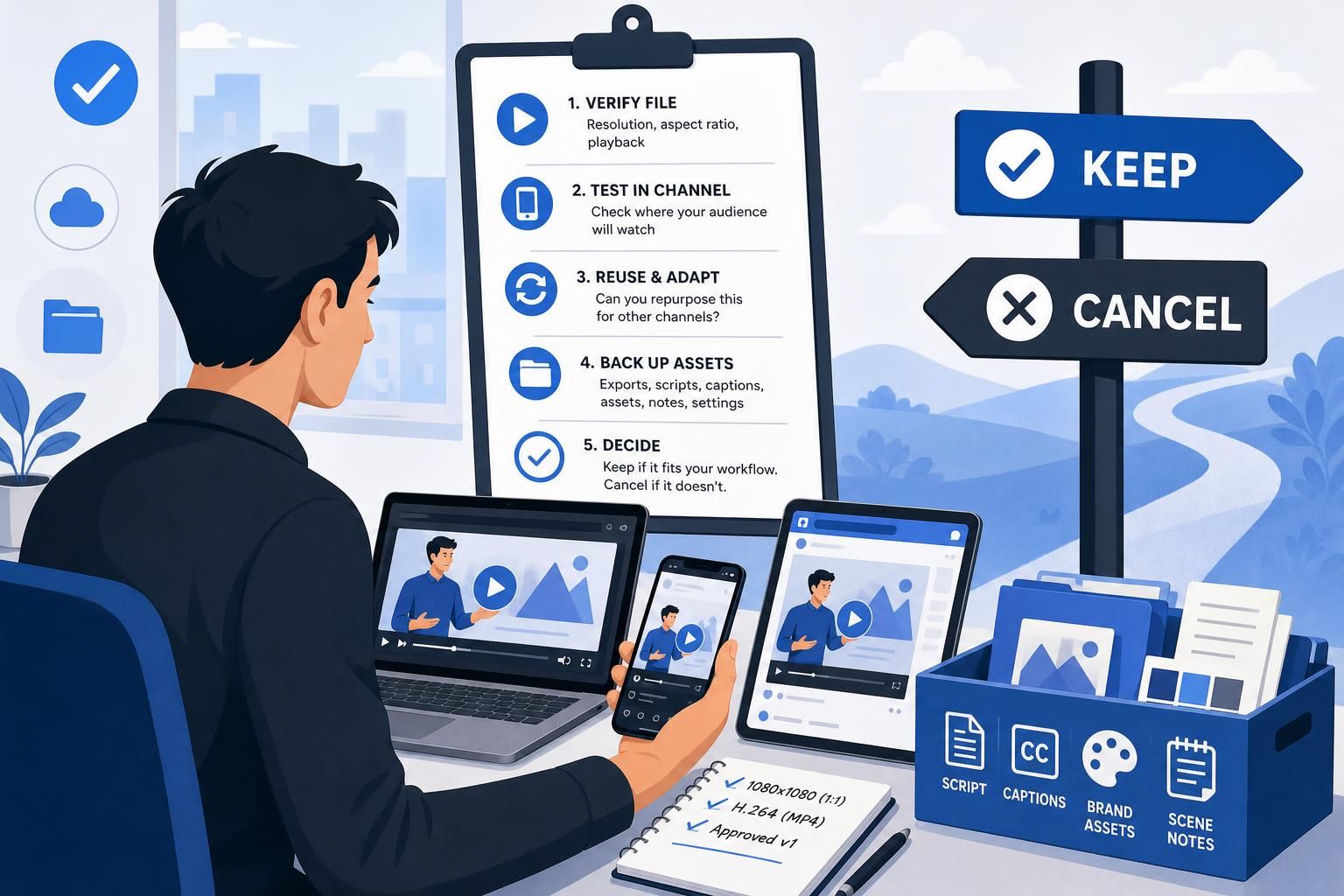
1. Verify the file itself first
Open each export in at least one desktop player and, if possible, one mobile device. Confirm the resolution, aspect ratio, and overall playback. Scrub through the start, middle, and end, not just the opening seconds, to catch clipped audio, timing issues, or corruption. If the file is meant for a specific placement, compare its dimensions to that placement before deciding it is finished.

Hypothetical example: A marketer exports a 30-second product explainer in 16:9 for YouTube and a square version for social ads. The files both open cleanly, but the square version shows tighter text spacing. That is not a failed export; it is a cue to revise the layout for the smaller frame.
2. Test exports where they will actually be used
Do not judge the video only in a desktop player. Stage it in the environment where the audience will watch it, such as a social draft, a CMS preview, or an internal review folder. Platforms often change the appearance through compression or playback settings, so a file that looks crisp locally may soften after upload.
When you test in the real destination, check readability first. Small text, thin logos, and dense disclaimers are the first elements to suffer. If the export needs manual correction only after upload, the file may still be usable, but the workflow is less efficient than it first appeared.
3. Judge whether the export is reusable
A good trial result is not just one acceptable video. It is an export you can adapt again with minimal friction. Save the finished file, a caption transcript if you created one, and a short note on the project settings that worked. Then ask whether the same content could become a website embed, a paid social ad, or a sales intro clip with only modest changes.
For small-business marketing, repurposing often matters more than novelty. If the export is usable in multiple channels, the trial has demonstrated practical value. If it only works in one narrow format, that still may be useful, but the software’s fit is more limited than a single successful render suggests.
4. Back up what you may need to rebuild later
Before the trial ends, store the final exports in a local or managed folder structure and separate them from working files. Keep script copy, scene order, brand colors, thumbnail drafts, captions, and any imported assets you are entitled to keep. Add a short note describing frame size, export format, and the version approved for use so future revisions are easier to recreate.
Hypothetical example: A small business team builds a lead-gen explainer, approves a 1080×1080 social version, and then realizes two weeks later that they need a 16:9 version for the website. Because the team saved the script, scene notes, and project settings, they can rebuild the second version faster even if the trial account is no longer available.
5. Decide keep or cancel based on workflow fit
A successful export is only one data point. Keep the subscription only if the final output fits your brand, the file plays reliably in your actual channels, and the workflow saves enough time to justify continued use. Cancel if the export worked but required too much manual correction, if the outputs are too limited for your needs, or if the saved assets are not enough to support future work.
If you are still deciding how to structure the trial itself, Plan a Useful 14-Day Video Software Trial helps you organize the whole window around real deliverables. If you are comparing the export stage with earlier production work, Adapt a Video Template Without Losing Your Brand Identity covers the branding step, while Review Voiceovers and Lip Sync Before Exporting an Explainer focuses on the quality checks that should happen before this final review.
FAQs, Mistakes & Expert Insights
Mistakes that can distort your export decision
Confusing export success with channel readiness. A file can export cleanly and still be wrong for the destination if the frame shape, text density, or audio balance does not suit the platform.
Testing only on a laptop. Mobile playback and platform compression often reveal problems a desktop player hides. If your audience is likely to watch on phones, include a phone check.
Keeping only the final MP4. Without scripts, scene notes, and project settings, you may have to rebuild the work from memory.
Assuming cancellation preserves the in-account project. Official support says cancelled trial accounts lose video creations, so local backups are the safer assumption.
Confusing unlimited exports with unlimited AI generation. The official trial materials separate export access from AI credits. The trial includes 750 AI credits, so AI features still have a bounded allowance even when exports are unrestricted.
Nuanced insight: export quality helps you measure fit, not just output
The best export test is not whether one file looks polished in isolation. It is whether the export can support repeatable production for your team. If you can save the right assets, reproduce the format, and create useful variations without major rework, the tool is closer to a fit. If not, a technically successful export may still point to an awkward workflow.
Reader question 1: What should I check first in a trial export?
Start with resolution, aspect ratio, and playback. Those three checks tell you whether the file is technically usable before you spend time on style. After that, confirm that the video still reads well on the device where it will actually be watched, especially a phone for social content.
Reader question 2: Should I test exports only on my laptop?
No. Laptop playback can hide problems that show up on mobile devices or after platform compression. A safer method is to compare the local file with a social draft, website preview, or other destination environment that matches your real use case.
Reader question 3: What should I save before the trial ends?
Save the final exports, scripts, captions, scene notes, and any brand assets you are allowed to keep. Also record frame size, export format, and any settings that helped the video work well. That archive makes later rebuilds and edits much easier.
Reader question 4: Does a successful export mean I should keep the subscription?
Not by itself. Keep or cancel based on whether the exported videos fit your brand, your channel requirements, and your workflow. If the export looks good but needed too much correction, the software may still be a poor long-term match.
Reader question 5: Is there a reason to test multiple export versions?
Yes. If you publish in more than one place, a second aspect ratio or a lighter-text version can show whether the same project is reusable. That matters because repurposability often tells you more about everyday value than one perfect file does.
For a deeper look at the trial itself, go to CreateStudio Free Trial: All Access Features, Billing and What to Test. If you are still working through the production stages, Storyboard a Short Animated Explainer Before Opening the Editor and Review Voiceovers and Lip Sync Before Exporting an Explainer are the most relevant next reads. For the broader trial sequence, Plan a Useful 14-Day Video Software Trial and Adapt a Video Template Without Losing Your Brand Identity round out the workflow.
What should I check first in a trial export?
Start with resolution, aspect ratio, and playback. Those three checks tell you whether the file is technically usable before you spend time on style. After that, confirm that the video still reads well on the device where it will actually be watched, especially a phone for social content.
Should I test exports only on my laptop?
No. Laptop playback can hide problems that show up on mobile devices or after platform compression. A safer method is to compare the local file with a social draft, website preview, or other destination environment that matches your real use case.
What should I save before the trial ends?
Save the final exports, scripts, captions, scene notes, and any brand assets you are allowed to keep. Also record frame size, export format, and any settings that helped the video work well. That archive makes later rebuilds and edits much easier.
Does a successful export mean I should keep the subscription?
Not by itself. Keep or cancel based on whether the exported videos fit your brand, your channel requirements, and your workflow. If the export looks good but needed too much correction, the software may still be a poor long-term match.
Is there a reason to test multiple export versions?
Yes. If you publish in more than one place, a second aspect ratio or a lighter-text version can show whether the same project is reusable. That matters because repurposability often tells you more about everyday value than one perfect file does.
Summary & Next Steps
Use export review as a decision tool
By the end of the trial, the main question is not whether the editor can create a file. It is whether the exported videos are usable in your real channels and whether you have preserved enough material to continue without starting from zero. That is the practical standard for a small-business marketing workflow.
What to do before billing begins
Finish your export checks, copy the files and notes you want to keep, and make a clear keep-or-cancel decision before day 15. If you continue, do so because the export workflow supports your content process. If you cancel, do so knowing that the official help center warns that account creations are deleted when the trial ends.
Next articles in the sequence
Continue with the surrounding support articles if you want to test the earlier steps that affect export quality. Plan a Useful 14-Day Video Software Trial, Storyboard a Short Animated Explainer Before Opening the Editor, Adapt a Video Template Without Losing Your Brand Identity, and Review Voiceovers and Lip Sync Before Exporting an Explainer all help you judge the trial on real production work rather than on one isolated render.
Explore CreateStudio to check the current options against your requirements.

[…] decision stage, the next practical steps are template customization, voice and lip-sync review, and export checks before renewal. You can also revisit the official offer page through CreateStudio if you need to recheck the […]