

Commission disclosure: This article contains an affiliate link to TubeTarget. If you choose to explore it through the link below, ProdifyDigital may earn a commission at no extra cost to you.
Direct Answer & Introduction
Quick answer: what a placement research brief should do
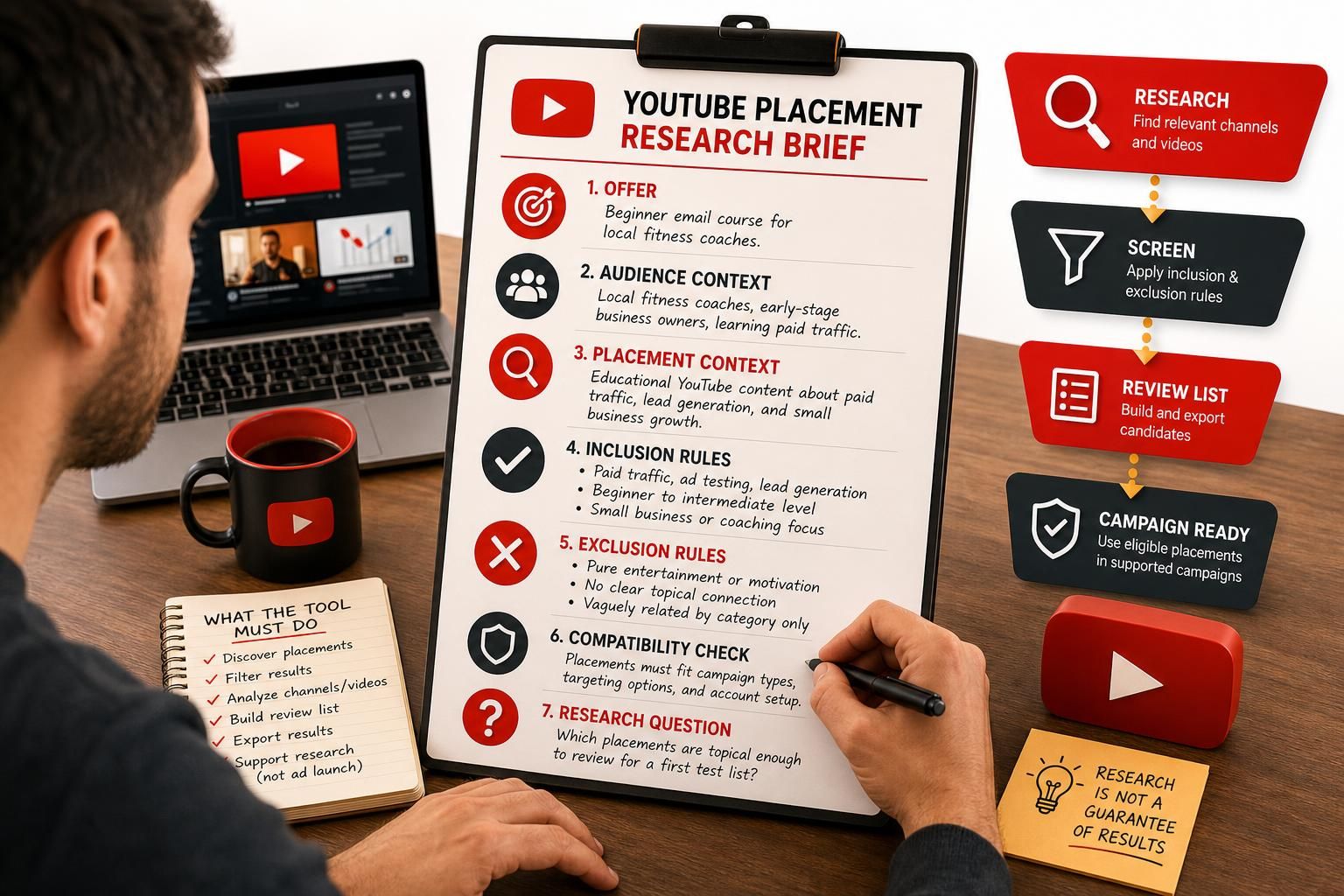
A YouTube placement research brief is a short planning document that defines your offer, the audience you want to reach, the placement context you are screening, and the exact research questions your tool should help answer. If you write that down first, you can compare tools on workflow fit instead of getting distracted by feature lists that may not matter to your campaign.
This guide is for advertisers who are considering YouTube placement research and want to decide whether a subscription fits their current workflow. The outcome is practical: you should be able to separate research, campaign eligibility, and measured results before you spend on software or ad delivery.
For platform context, Google Ads Help’s About placement targeting article, checked on 18 September 2026, says placement targeting is available in eligible campaign contexts, while content targeting is not available for video conversion campaigns as described there. In plain terms, your brief should support screening and planning; it should not assume that a chosen placement guarantees impressions or conversions.
Who this helps
If you are trying to decide whether TubeTarget fits your process, this guide gives you a way to judge that decision before purchase. It is also useful if you already know your niche is too broad and need to turn it into a tighter set of screening rules.
Fundamentals
What the brief is for
A placement research brief is not a media plan and not a promise of performance. It is a working document that helps you answer a narrower question: “What kind of YouTube placements should I even be reviewing?” That matters because a vague search can waste time on channels that are popular but irrelevant to the offer.
Think of the brief as a filter for decision-making. It helps you decide what belongs in scope, what should be excluded, and what kind of research support you actually need from a tool. If those choices are unclear, you may buy software that is more capable than your workflow requires—or less useful than you expected.
Essential terms to define first
| Term | What it means in practice | Why it matters |
|---|---|---|
| Offer | The product, service, lead magnet, or page you want the research to support | Different offers need different placement signals |
| Audience | The viewer type you think is relevant, described by context rather than hype | Prevents you from treating broad interest as a match |
| Placement | A channel, video, or other YouTube surface you may review for ads | Clarifies what the tool is helping you find |
| Inclusion rule | A criterion that makes a placement worth reviewing | Helps you narrow the search |
| Exclusion rule | A criterion that removes a placement from consideration | Reduces noise and wasted screening time |
| Compatibility check | A quick check that your placements fit the campaign setup you can actually run | Separates research from delivery |
That last term is important. A placement can look relevant and still fail your real-world setup because campaign type, targeting options, and account conditions matter. Research quality and campaign compatibility are related, but they are not the same thing.
How to read advertised software capabilities
TubeTarget is advertised as a browser-based YouTube placement-research tool with channel, video, keyword, campaign, analysis, and CSV export features for Google Ads. Those are the kinds of capabilities you would match against your brief. But advertised capability is not the same as hands-on testing, and it is not the same as universal compatibility with every workflow or import format.
The sales page also lists Elite Monthly at $27 and Elite Yearly at $97, plus a 30-day refund policy. Support descriptions on the page conflict, so treat the exact hours carefully and verify checkout details before purchase. Ad budget is separate from software cost, and that separation belongs in the brief as well.
Main Process / Strategies
Step 1: define the offer in one sentence
Start with a sentence that says what you are promoting and who it is for. For example: “We sell a beginner-friendly email course for local fitness coaches who want more consultation bookings.” That sentence is useful because it gives you a subject, a user type, and a business outcome without pretending that every fitness-related channel is relevant.

If you cannot write the offer clearly in one sentence, pause. Decide whether your goal is direct sales, lead generation, brand awareness, affiliate promotion, or content distribution. Each goal can change what counts as a useful placement.
Step 2: narrow the audience to an observable context
“People interested in marketing” is too broad for placement research. “Solo service businesses that are learning paid traffic” is more specific because it gives you a context for judging relevance. You are not saying every viewer will convert; you are saying the surrounding content is closer to your offer.
A useful brief answers questions like these:
- What niche or sub-niche does the offer address?
- What level of prior knowledge do you want in the viewer?
- What adjacent topics are acceptable?
- What topics are out of scope even if they have large audiences?
This is where a tool can save time, but only after you know what “good” means for your account.
Step 3: write inclusion and exclusion rules
Rules make the brief usable. They stop the search from turning into an endless list of vaguely related results. Here is a hypothetical example:
| Rule type | Example | Why it helps |
|---|---|---|
| Include | Channels and videos about paid traffic, ad testing, or lead generation for small businesses | Likely closer to the offer |
| Include | Educational content for beginner-to-intermediate advertisers | Matches the support level of the offer |
| Exclude | Pure entertainment channels with no topical connection | Low research value for this workflow |
| Exclude | Placements that are only vaguely related by category, with no clear topic signal | Reduces noisy results |
These rules do not predict performance. They simply make the screening process more disciplined.
Step 4: decide what the tool must actually do
Before comparing products, decide which tasks matter most:
- Find channels or videos by keyword.
- Filter results to reduce irrelevant placements.
- Review channel or video information in one place.
- Build a review list you can export or hand off.
- Support research without blurring into ad launch work.
Once you do that, a tool like TubeTarget becomes easier to evaluate. If your brief says you need discovery, filtering, and export support, then those are the functions to check first. If you mainly need campaign management or account operations, a placement-research tool may be only one part of the workflow.
Worked example: turning a vague niche into a usable brief
Imagine an advertiser who starts with this line: “I want to run YouTube ads for my coaching business.” That is too vague to guide placement research well. It does not say who the coaching is for, what stage the audience is in, or what kind of content should be reviewed.
Now revise it into a usable brief:
- Offer: a lead magnet for new solo coaches who need a simple intake system.
- Audience: early-stage coaches with little paid-traffic experience.
- Placement context: educational channels covering coaching business setup, lead generation, or beginner ad strategy.
- Include: videos explaining client acquisition, funnel setup, or ad basics.
- Exclude: broad motivation content, generic entrepreneurship entertainment, and channels unrelated to business learning.
- Research question: Which placements are topical enough to review for a first test list?
Before the brief, the advertiser might search broadly and waste time comparing unrelated channels. After the brief, the search becomes narrower and easier to repeat. That does not guarantee better results; it just makes the research process clearer.
How to compare a tool against the brief
Use your brief to ask practical comparison questions:
| Question | What you are checking | Why it matters |
|---|---|---|
| Does it help me discover placements aligned with my rules? | Discovery quality | Prevents overly broad searching |
| Can it handle the amount of results I expect? | Volume and usability | Avoids a tool that slows you down |
| Does it help me organize candidates into a review list? | Workflow structure | Useful when research must be shared or revisited |
| Does its export output fit my process? | Handoff and reuse | Relevant only if you need exports |
| Do paid upgrades make sense for my frequency of use? | Cost fit | Prevents paying for capacity you do not need |
That is the decision logic this guide is meant to support. It keeps the software conversation grounded in the actual task instead of in generic promises.
FAQs, Mistakes & Expert Insights
Common mistakes and misconceptions
Mistake 1: confusing broad interest with placement relevance. A niche can be popular and still be a poor fit if the surrounding content is too far from your offer.
Mistake 2: using channel size as the main filter. Larger channels are not automatically better research candidates. Topic fit and context usually matter more.
Mistake 3: assuming the tool can solve an unclear brief. Software can speed up the search, but it cannot define your audience or exclusions for you.
Mistake 4: treating research as proof of buyer intent. Placement research helps you screen candidates. It does not prove that a viewer is ready to buy or that an ad will convert.
Mistake 5: ignoring campaign eligibility. A placement can look promising and still be unsuitable for the actual campaign context available in your account.
Nuanced insights that improve the brief
Speed is only useful if your filters are good. A fast search with weak criteria can produce more noise, not better decisions. In many cases, a slower but clearer brief saves more time than a feature-rich tool used without structure.
CSV export is also conditional. It is valuable when you need to share, sort, or review candidates outside the tool. It is less useful if you only want a quick internal scan. So the question is not “Does it export?” but “Will exporting placements change how I work?”
Another useful distinction is between research cost and media cost. Software may help you build a placement list, but it does not pay for the ad campaign itself. Keeping those budgets separate helps you judge whether the tool is worth the subscription for your stage of work.
Five reader FAQs
What should be in a YouTube placement research brief? It should define your offer, intended audience, placement context, inclusion rules, exclusion rules, and the research task you want the tool to support. The more concrete those points are, the easier it becomes to compare tools without guessing.
Do I need a research brief before choosing TubeTarget or any similar tool? Yes, if you want the choice to reflect your actual workflow. A brief helps you decide whether you need discovery, filtering, analysis, or export support, rather than buying based on broad claims.
Can a good placement brief predict conversions? No. It can improve the quality of your screening process, but it does not predict ad results. Conversion depends on factors outside placement research, including offer quality, ad setup, and budget allocation.
Should I prioritize channel size or topic fit? Topic fit usually comes first. A larger channel that is only weakly related to your offer may be less useful than a smaller, better-matched one for research purposes.
Is CSV export required for every workflow? Not necessarily. It is useful when you want to organize, share, or review placement candidates outside the tool, but only if that fits your process.
What should be in a YouTube placement research brief?
It should define your offer, intended audience, placement context, inclusion rules, exclusion rules, and the research task you want the tool to support. The more concrete those points are, the easier it becomes to compare tools without guessing.
Do I need a research brief before choosing TubeTarget or any similar tool?
Yes, if you want the choice to reflect your actual workflow. A brief helps you decide whether you need discovery, filtering, analysis, or export support, rather than buying based on broad claims.
Can a good placement brief predict conversions?
No. It can improve the quality of your screening process, but it does not predict ad results. Conversion depends on factors outside placement research, including offer quality, ad setup, and budget allocation.
Should I prioritize channel size or topic fit?
Topic fit usually comes first. A larger channel that is only weakly related to your offer may be less useful than a smaller, better-matched one for research purposes.
Is CSV export required for every workflow?
Not necessarily. It is useful when you want to organize, share, or review placement candidates outside the tool, but only if that fits your process.
Summary & Next Steps
Key takeaways
A good YouTube placement research brief turns a vague niche into a usable screen for tool comparison. It defines the offer, the audience context, and the inclusion and exclusion rules that matter to your workflow. It also helps you keep research separate from campaign delivery and from outcome expectations.
If your brief says you need placement discovery, filtering, channel or video analysis, and export support, then the TubeTarget offer is worth reviewing against that checklist. If your brief is still vague, tighten it first so you buy for the workflow you actually have.
For the next stage, move from this brief into channel relevance screening, then into building a campaign-ready review list, and then into separating software cost from ad budget. Those steps keep the process grounded.
When you are ready to assess the offer itself, use the TubeTarget link to review whether its advertised research workflow matches the brief you just wrote.
Continue with a related guide
For evaluate this tool, read TubeTarget Review: YouTube Placement Research, Pricing and Practical Limits.
