

 Commission disclosure: This review may use affiliate links. If you choose TubeTarget through the branded link, ProdifyDigital may earn a commission at no extra cost to you.
Direct Answer & Introduction
Quick answer
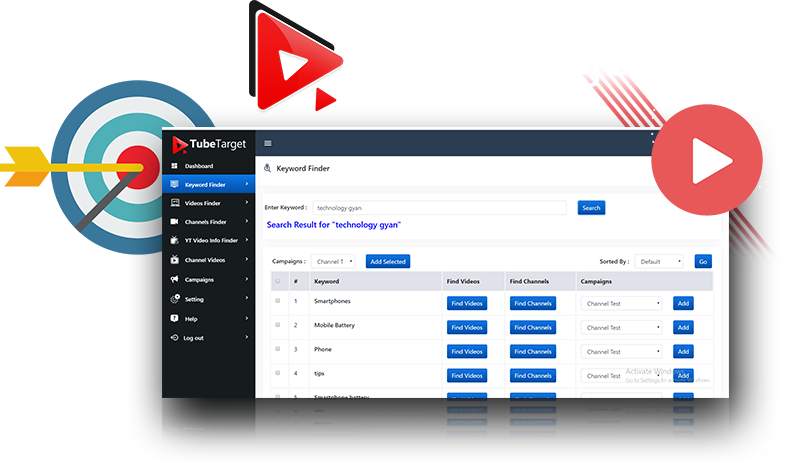
TubeTarget is worth considering if your main need is YouTube placement research for a Google Ads workflow, not a promise of cheap traffic or better results by itself. Based on the official sales page checked on 18 September 2026, it is presented as a browser-based research tool with Video Finder, Channel Finder, Keyword Finder, video analysis, campaign-building, CSV export for Google Ads, and paid tiers for more capacity. That makes it relevant for advertisers who want to shortlist channels and videos more efficiently, then decide whether those placements fit their campaign plan.
TubeTarget is less compelling if you want a tool that automatically delivers buyer intent, guarantees low CPC, or replaces media spend and campaign strategy. Placement research can help you organise options; it does not prove commercial intent, and it does not guarantee impressions or conversions.
Who this review is for
This review is for advertisers who are trying to decide whether a research subscription fits a specific YouTube advertising workflow. The practical question is not “Can this tool make ads work?” but “Will it save enough research time and improve shortlist quality enough to justify the software cost alongside ad spend?”
The official sales page also presents a 30-day refund policy, but its support wording conflicts: one section says 24/6 chat support, while another says 24/7 assistance. That kind of mismatch is one reason to verify checkout terms and support details before purchase.
Fundamentals
What TubeTarget is advertised to do
TubeTarget is described by Teknikforce as a browser-based SaaS for finding YouTube channels, videos and keywords for ad placement research, then organizing those findings into campaigns and CSV output for Google Ads. In plain language, it is a research and preparation tool. It helps you discover candidate placements and structure them for review. It is not an ad platform, and it is not the same thing as buying traffic.
That distinction matters. A research tool can reduce manual searching, but the quality of the outcome still depends on your offer, audience definition, campaign settings and budget. The tool can help you make better choices; it cannot turn an irrelevant offer into a strong one.
Placement research versus campaign delivery
Google Ads help documentation titled “About placement targeting”, checked on 18 September 2026, indicates that placement targeting is available in eligible campaign contexts, while content targeting is not available for video conversion campaigns as described there. It also means chosen placements compete in auctions, so selection does not guarantee impressions. Keep that platform context in mind when evaluating any placement-research tool.
| Decision layer | What it answers | What it does not prove |
|---|---|---|
| Research tool | Which channels, videos or keywords are worth reviewing | Traffic quality, conversion rate or auction access |
| Ad platform rules | Whether the campaign type can use placement targeting | Which placements will win delivery |
| Campaign execution | How your budget, creative and targeting perform together | Guaranteed buyer traffic or low cost per result |
Advertised pricing and license limits
The sales page advertises two paid options: Elite Monthly at $27 and Elite Yearly at $97, with free upgrades included in those tiers. Those prices are part of the public offer checked on 18 September 2026, but the page does not establish unlimited account capacity for every use case. It specifically mentions that more campaigns and videos may require an upgrade. As with any software purchase, confirm the exact checkout terms before you buy.
The page also advertises a 30-day refund policy. That is a useful risk-control feature, but it is still a policy that should be read at checkout, not assumed beyond the vendor’s stated terms.
Main Process / Strategies
How to judge fit before buying
The best way to assess TubeTarget is to start with your workflow, not the sales claims. Ask four questions:
- Do I need help finding potential YouTube placements faster than manual search?
- Will I actually use channel, video and keyword research to build a shortlist?
- Can my campaign type use placement targeting in the current Google Ads context?
- Am I budgeting for software separately from ad spend?
If the answer to the first two is yes, and the second two are under control, a research tool may be useful. If you are still unclear on audience, message, or budget, buying software first usually just speeds up confusion.
A hypothetical advertiser workflow
Imagine a small ecommerce advertiser planning YouTube placements for a niche product. Before buying any tool, they define the audience as “people watching review and comparison content around home office accessories.” They also write down exclusions: no placements on entertainment channels, no assumption that subscriber count equals intent, and no expectation that a low CPC means profitable traffic.
After reviewing a tool like TubeTarget, they might use it to build a candidate list of monetized channels and keyword-based videos. Then they would clean the list, remove channels with weak topical relevance, and check whether the resulting placements fit the intended campaign type in Google Ads. If the shortlist is still too broad, they would refine the audience brief before spending on media.
That is a sensible before/after decision. Before: a vague search for “YouTube traffic.” After: a structured shortlist, a clearer filter for relevance, and a decision on whether the campaign is ready. No result is promised; the benefit is better decision-making.
A simple evaluation method you can use
If you want a practical buying filter, score the tool against five criteria:
- Research speed: Does it reduce manual placement hunting enough to matter?
- Relevance control: Can you separate topical fit from popularity?
- Workflow fit: Does it support the way you review, shortlist and export?
- Budget fit: Can you afford the subscription without shrinking media spend too much?
- Support clarity: Are refund and support terms clear enough for your risk tolerance?
This kind of scorecard is more useful than asking whether the software is “good” in the abstract. A tool can be perfectly reasonable for one advertiser and unnecessary for another.
How to keep software cost and ad cost separate
A common mistake is to treat the software subscription as if it includes advertising performance. It does not. TubeTarget is the planning layer; Google Ads spend is the delivery layer. If you buy a subscription and then cut your media budget too sharply, you may save on software but starve the campaign of enough spend to learn anything useful.
A more disciplined approach is to set a bounded test: one subscription period, one small media budget, and one explicit review date. If the research output is useful but the campaign does not fit your current offer, you can pause and keep the learning. If the tool feels redundant, you can exit before renewal.
TubeTarget fits best when the subscription supports a defined research process rather than a hope that “more placements” will automatically produce better results.
Worked comparison: vague buying versus structured buying
| Decision point | Vague approach | Structured approach |
|---|---|---|
| Audience | “Anyone on YouTube” | Specific topic, viewer context and exclusion list |
| Research | Collect as many placements as possible | Collect placements that match a defined brief |
| Platform fit | Assume any placement can run anywhere | Check campaign eligibility in Google Ads first |
| Budgeting | Software and ads mixed together | Separate subscription cost from media spend |
| Success criterion | Cheap clicks alone | Relevant shortlist and usable campaign setup |
That comparison shows why placement research should be treated as preparation. It can improve your odds of making a better campaign decision, but it cannot substitute for campaign strategy or measured testing.
FAQs, Mistakes & Expert Insights
Common mistakes and misconceptions
1) Assuming placement research equals buyer intent. A channel or video can be relevant without being ready-to-buy traffic. Relevance is contextual, not transactional.
2) Confusing targeting with delivery. Even good placements still compete in auctions. Selection does not guarantee impressions.
3) Treating CPC as the whole story. Cheap clicks are not useful if the landing page, offer or audience fit is weak.
4) Ignoring campaign eligibility. Before relying on a placement workflow, confirm that your current campaign type can use placement targeting as described in Google Ads Help.
5) Mixing ad budget with tool budget. A tool subscription can be worth it and still be wrong for your total spend level if it crowds out media testing.
What the official materials do and do not establish
The official sales page establishes advertised capabilities, public price points, a refund policy and conflicting support wording. It does not establish your personal result, your ROI, or that every paid license covers every possible use case. It also does not replace a current platform check in Google Ads or a review of your own account structure.
In other words: use the vendor page to understand the offer, and use the platform documentation to understand the current placement context. Those are related, but they are not the same source of truth.
Five reader questions
Is TubeTarget a good fit if I already know my audience?
It can still help if you need a faster way to gather candidate placements and organize them for review. If your placement list is already strong, the marginal value may be lower.
Does TubeTarget replace Google Ads knowledge?
No. It can support placement research, but you still need campaign eligibility knowledge, budgeting discipline and creative judgment.
Can I assume the exported list will work in every campaign?
No. Exporting a list is not the same as confirming compatibility in your current campaign setup.
Should I buy the monthly or yearly tier?
That depends on how long you expect to use the workflow. If you are testing fit, a shorter commitment is easier to justify. If you already know you need the tool regularly, a yearly plan may be more practical—provided you verify terms at checkout.
What is the main risk in buying too early?
You may spend on software before you have a clear brief, a compatible campaign type, or enough media budget to test what the research actually produces.
Is TubeTarget a good fit if I already know my audience?
It can still help if you need a faster way to gather candidate placements and organize them for review. If your placement list is already strong, the marginal value may be lower.
Does TubeTarget replace Google Ads knowledge?
No. It can support placement research, but you still need campaign eligibility knowledge, budgeting discipline and creative judgment.
Can I assume the exported list will work in every campaign?
No. Exporting a list is not the same as confirming compatibility in your current campaign setup.
Should I buy the monthly or yearly tier?
That depends on how long you expect to use the workflow. If you are testing fit, a shorter commitment is easier to justify. If you already know you need the tool regularly, a yearly plan may be more practical—provided you verify terms at checkout.
What is the main risk in buying too early?
You may spend on software before you have a clear brief, a compatible campaign type, or enough media budget to test what the research actually produces.
Summary & Next Steps
Key takeaways
TubeTarget is best understood as a YouTube placement-research and campaign-preparation tool. Its public offer, checked on 18 September 2026, includes Video Finder, Channel Finder, Keyword Finder, video analysis, campaign creation and CSV export for Google Ads, plus Elite Monthly and Elite Yearly pricing. It may save time for advertisers who already have a defined workflow and a compatible campaign plan.
What it does not do is guarantee traffic, buyer intent, impressions or returns. Placement targeting must still fit the campaign type, and ad spend remains a separate cost. The useful question is not whether the software sounds powerful; it is whether it makes your current research process clearer and more efficient.
What to do next
If you are evaluating a YouTube advertising workflow now, review your audience brief, current campaign eligibility and budget split first. Then use the branded TubeTarget link only if the tool still looks like a practical fit for your process. If you buy, start with a bounded test period and treat the first month as a workflow evaluation rather than a promise of performance.
For a better decision path, continue with the supporting guides on building a research brief, assessing channel relevance, cleaning a placement list, judging ad test results and separating software budget from media budget. Together they turn a vague interest in YouTube ads into a more usable plan.
Build a YouTube placement research brief · Assess YouTube channel relevance · Create a campaign-ready review list · Judge YouTube ad test results · Budget for research tools and ads separately
TubeTarget can be a sensible purchase for the right workflow, but only if the tool’s role, your campaign fit and your media budget all make sense together.

[…] For evaluate this tool, read TubeTarget Review: YouTube Placement Research, Pricing and Practical Limits. […]