

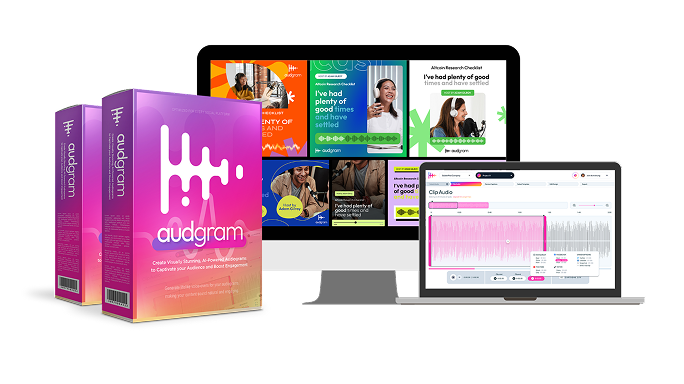
 Commission disclosure: If you buy AudGram through our link, ProdifyDigital may earn a commission at no extra cost to you.
AudGram is positioned as a web-based tool for turning existing audio, video, or pasted text into audiogram-style social clips. This review is an evidence-based buying decision page for the live entry offer checked on 2026-09-14, not the separate all-access bundle. For podcasters, educators, and small marketing teams, the main question is whether the offer’s render credits, storage limits, and export workflow fit the way you actually repurpose spoken content.
The short answer is that the entry offer looks useful for a focused “clip, caption, brand, export” workflow. It is not a hearing-test or audiology product, and it should not be treated as a full video editor or a general AI-audio production suite. If you want a practical starting point, this page explains the confirmed features, the material limits, and the checkout questions worth verifying before you pay.
See the buying-decision context for the live offer before comparing it to upgrade paths or unrelated site pages.
What AudGram is and who it is for
Based on the official live offer page checked on 2026-09-14, AudGram is built to convert spoken content into visual audiograms. The core use case is repackaging audio or video into a short social asset with captions, waveform motion, a progress bar, and a customizable template. The vendor also states that users can paste text and generate audio through text-to-speech, although the exact voice options belong to plan-specific marketing language and should be confirmed on the tier you are buying.

That makes the entry offer most relevant for three groups. Podcasters can use it to turn interview highlights, episode hooks, or listener-friendly quotes into promotional clips. Educators can use it for short lesson teasers, announcements, or excerpt-based explainers. Small marketing teams can use it as a faster alternative to commissioning every promo asset from scratch. The value proposition is speed and consistency, not a promise that the platform replaces every editing tool in your stack.
The live page also frames the purchase as a lifetime-style access offer with monthly usage controls. That matters because a one-time payment is only attractive if your production volume stays within the included render minutes and storage rules.
Entry-offer features confirmed from the live page
The live offer page lists a clear set of entry-level features. The most relevant confirmed items are:
- 300 monthly credits, described as roughly five hours of rendering
- 1 credit equal to 1 minute of rendering time
- Automatic transcription with captions
- Customizable template library
- 1:1 square, 16:9 landscape, and 9:16 portrait formats
- Built-in trim and resize tools
- Waveform animations and progress bars
- Caption design library
- Unlimited projects
- Watermark-free videos
- 50 GB of storage
- 30 days of data retention
- Native SEO features and future updates
For most buyers, that is enough to build a repeatable audiogram pipeline. You can upload a clip, trim it to a usable excerpt, let captions generate, choose a template, adjust colors and fonts, and export in the format you need. The feature list is specifically aligned with repurposing spoken content into social promotion assets, which is the right job for a podcaster or small team that wants to publish more often without hiring a designer for every version.
One practical distinction matters here: unlimited projects is not the same as unlimited rendering, and it is not the same as permanent storage. The usage controls are separate. If you are trying to estimate how much content the plan really supports, the credits and retention window are the numbers that matter most.
For workflow planning, it can help to think about the content pieces separately. Choosing the right excerpt is the first decision, while caption review before export is where avoidable errors are usually caught.
Limits and cautions: credits, storage, retention, checkout pricing, and tier confusion
The entry offer is useful, but it needs careful reading. The live page says 1 credit equals 1 minute of rendering time, with 300 monthly credits included. That means your practical throughput is capped by render minutes, not by project count. If you repeatedly revise and rerender the same audiogram, you should expect those extra renders to consume credits unless the checkout terms say otherwise. The supplied evidence does not spell out rounding rules, so it is wise to confirm whether partial minutes are rounded up.
Storage and retention are also materially limited. The live offer states 50 GB of data storage and 30 days of data retention. That suggests a separate file-space cap and a retention policy, but the source material does not define exactly what is deleted after 30 days, whether originals and exports are treated differently, or whether anything is recoverable after deletion. If you want the platform to act as a long-term archive, verify that assumption before purchase.
Pricing needs equal caution. The live page displays a $67 offer with the AUDGRAM code, but the page also contains conflicting baseline price language. Because the supplied sources do not resolve that conflict, the safest reading is to treat the displayed $67 as the checked 2026-09-14 presentation and confirm the final checkout amount before buying. Do not assume taxes, add-ons, or any coupon effect until you see the cart total.
There is also a tier-confusion risk. Voice cloning and multi-voice language appear in other vendor materials and upgrade language, but those features should not be attributed to the entry offer unless the purchased tier clearly includes them. The same caution applies to any “all future updates” or lifetime wording: that describes access language, not a promise of permanent service, unlimited capacity, or unchanged product scope forever.
Finally, do not read the offer as a guarantee of transcription accuracy, virality, or conversions. Audio quality, excerpt selection, caption review, and visual design all still affect the outcome.
Workflow fit: upload, trim, captions, templates, export
The most useful part of the live page is the workflow sequence it shows. Upload an audio or video file, clip the segment, review captions, select a template, customize the design, and export. That is a straightforward production path, and it matches the needs of teams turning spoken material into social promotion assets.
In practical terms, AudGram seems strongest when you already have a source file and you want a fast derivative clip. Upload is the input step. Trim and resize help you isolate a complete thought from a longer interview or lesson. Captions matter because many social viewers watch silently or with sound off. Templates help you keep a consistent look across episodes or campaigns. Export completes the process without forcing you into a separate editor for basic output formats.
The format options are also relevant. The live offer states support for 1:1, 16:9, and 9:16 exports. That is enough to adapt the same idea for common social placements without rebuilding the asset from scratch. It does not mean every network has the same upload rules, so publish-side requirements should still be checked separately. For design work, readability and brand hierarchy usually matter more than extra motion effects.
A sensible production habit is to keep the design restrained. A clear transcript, a readable font, a strong contrast ratio, and a controlled waveform generally beat overly busy motion. If a clip is intended to communicate one idea quickly, the design should support that idea rather than competing with it.
If you need to change aspect ratios after the first draft, crop and safe-space review should happen before export, not after the asset is already published.
Who should buy, who should skip, and what to confirm before checkout
Likely a fit: podcasters who publish frequent teaser clips, educators who want a simple way to turn spoken lessons into social promos, and small marketing teams that need a repeatable branded workflow. The entry offer is especially attractive when your main goal is to repurpose existing audio or video efficiently instead of commissioning one-off creative every time.
Likely not a fit: buyers who need a full podcast production suite, advanced video editing, or permanent media archiving. It is also not the right choice if you are assuming higher-end voice features are included in the entry offer by default. Those may exist elsewhere in the vendor’s ecosystem, but they should be treated as tier-specific until confirmed.
Before checkout, confirm four practical points. First, verify how credits are counted on re-renders. Second, ask whether partial minutes are rounded up. Third, confirm what is deleted after the 30-day retention window and what happens to original files. Fourth, check the final cart amount if the displayed $67 and AUDGRAM code are part of your decision. If your team needs careful versioning, export planning and archive discipline matter just as much as the first render.
If those limits match your workflow, the live entry offer can be a sensible tool for turning spoken content into repeatable social assets. If you need permanent storage, broad voice tooling, or a more expansive production environment, the safest move is to compare the exact tier you intend to buy rather than assuming the entry offer includes everything shown elsewhere on the site.
Buy from the official offer only after confirming the current checkout total: AudGram.
Bottom line: AudGram’s entry offer is best understood as a focused audiogram creator with useful captioning, template, and export tools, but with real usage limits on credits, storage, and retention. It is a workable fit for teams that already know what they want to clip and publish, provided the plan details match their production volume.
Reader questions
Is AudGram the same as a hearing test or audiology app?
No. The live offer reviewed here is for making audiogram-style social clips from audio, video, or pasted text. It should be treated as a creator tool, not a medical diagnostic product or a hearing-assessment app.
What do the 300 monthly credits actually limit?
The live page says 1 credit equals 1 minute of rendering time, with 300 monthly credits included. So the main limit is rendering time, not project count. If you rerender the same asset several times, those extra renders may consume credits again unless the checkout terms state something different.
Does unlimited projects mean unlimited storage or exports?
No. The offer separately lists 50 GB of storage and 30 days of data retention. Unlimited projects should be read as a project-count allowance, not as permanent storage or unlimited rendering capacity.
Are the voice cloning and multi-voice features included in the entry offer?
Do not assume that they are. Those features appear in other vendor marketing and upgrade language, but the entry offer should be evaluated on its own terms. Confirm the purchased tier if voice tools matter to your workflow.
What should I confirm before paying?
Confirm the final checkout total, whether partial render minutes are rounded up, how re-renders are charged, what is deleted after the 30-day retention period, and whether the specific tier you are buying includes any voice-related extras beyond the entry offer.
