

Commission disclosure: This educational guide includes a promotional link to the Adstorm Elite offer. If you choose to buy through it, ProdifyDigital may earn a commission at no extra cost to you.
If you’re trying to figure out what AI ad creative tools actually do, the short answer is: they help you draft ad ideas, generate variations, and speed up production, but they do not replace strategy, compliance review, or brand judgment. That makes them useful for solo marketers, founders, and small teams that need more ad options without turning creative work into a full-time bottleneck.
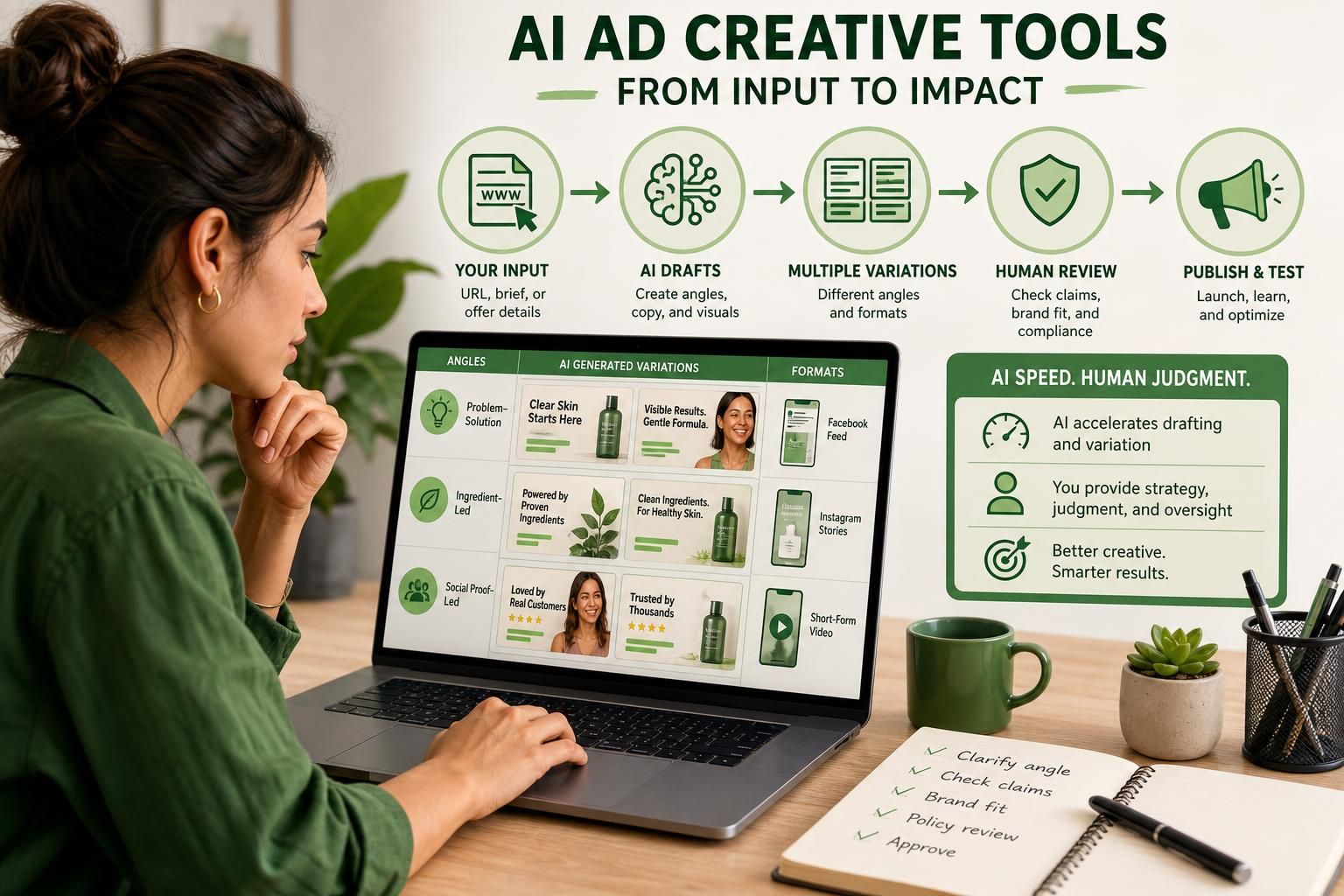
In practice, these tools sit between your input and your finished draft. You still decide the offer, audience, and claims; the software helps turn a URL, landing page, or brief into ad copy, visuals, and alternative angles. For a broader commercial lens, see the main review pillar, and for cost planning, the real cost guide is a useful companion.
Direct Answer & Introduction
The core job these tools are built to do
AI ad creative tools are built to reduce the time and effort needed to produce ad concepts. In practical terms, they can extract cues from a website or landing page, suggest headlines, draft body copy, assemble visuals or mockups, and produce multiple versions so you can test different angles. Think of them as production accelerators, not autonomous ad managers.
Who this guide is for
This article is for readers who want to understand the workflow before they buy a tool or hand one to a team member. If you manage your own campaigns, work in a small agency, or simply want a clearer sense of where AI helps and where it creates risk, the goal is practical clarity: know what the software can draft, what you still need to approve, and where human review protects your brand.
Fundamentals
Generation, editing, and publishing are separate jobs
A common mistake is treating all ad tools as if they do the same thing. They do not. Some tools focus on generation: creating new copy, headlines, or creative concepts from a prompt or URL. Others focus on editing: refining existing assets, changing layouts, or generating variants. A separate category handles publishing or campaign management. Understanding the difference helps you avoid expecting one tool to do everything well.
What “creative” means in an ad workflow
In advertising, creative is the visible and verbal part of the message: the image, video, headline, body copy, call to action, and format-specific version of those elements. AI ad creative tools usually work on these components because they are expensive to produce repeatedly. They are not the same as media buying tools, and they do not replace targeting decisions, bid strategy, or platform policy review.
Why speed changes the workflow
The main benefit is not magic performance. It is speed and volume. When a team can draft ten headline sets instead of two, or generate a landing-page-based creative draft in minutes instead of hours, testing becomes easier. That creates more options, but it also creates more noise. Without a clear process, speed can lead to rushed approvals and weak ad quality.
Main Process / Strategies
Step 1: Start with a clean input
The quality of the output depends heavily on the input. The most common starting points are a product URL, landing page, short brand brief, or plain-language summary of the offer. A useful input includes what the product is, who it is for, the main benefit, and any claims that must be avoided. If you feed in unclear positioning, the tool may produce generic creative that sounds polished but says very little.

Step 2: Decide which part of the workflow the tool should handle
A practical workflow is to ask the tool to do one job at a time. First, generate hooks or angles. Next, turn the strongest angles into copy drafts. Then create format-specific versions for placements such as feed posts, search ads, or short-form video concepts. Finally, review whether the creative still matches the offer and the platform.
Example: A small skincare brand might enter its product page and ask for three angles: problem-solution, ingredient-led, and social-proof-led. The tool can draft each angle into a short headline and primary text set. The human job is to remove overclaiming, choose the angle that fits the campaign goal, and make sure the claims are supportable.
Step 3: Use variations to compare message, not just design
Many readers assume these tools are mainly about making ads look nicer. Often, the bigger value is message testing. Different angles can change performance more than color changes or layout tweaks. One version may emphasize speed, another cost savings, and another specificity. That lets you compare which promise resonates without rewriting from scratch each time.
Step 4: Review for brand fit and compliance
This is the step that should never be skipped. Human review matters because AI can produce phrasing that is too broad, too repetitive, too salesy, or too close to disallowed claims. It can also miss nuance in regulated or sensitive categories. Brand review is not only about spelling and tone; it is about whether the ad stays faithful to the offer and the audience’s expectations.
Example: If a tool drafts “guaranteed results” for a service offer, the human editor should replace that with a defensible statement about process, features, or intended use. If the ad mentions a platform, policy-sensitive claims, or a competitor-like structure, review becomes even more important.
Step 5: Decide where originality comes from
Originality in AI ad work usually comes from your inputs, your offer framing, and your edits. The software may create fresh combinations, but you should not assume every draft is meaningfully distinct or strategically strong. If you rely on the first output every time, the result can become bland, repetitive, or too close to common market language. A better approach is to use AI as a starting point, then add a human point of view that reflects your brand.
Where Adstorm fits in this process
The official Adstorm sales and support materials, checked on 2026-09-26, describe Adstorm Elite as a browser-based web app that can create ad concepts from inputs such as a URL and generate multiple ad variations. Those materials also distinguish use rights: the Elite plan is presented as suitable for your own work or content you have rights to, while providing services for other people’s businesses is tied to upgraded options. That distinction matters because convenience software still carries licensing boundaries.
Adstorm’s vendor materials also frame the tool as a way to produce format-specific ad drafts for different channels. That is useful, but the practical question is still the same: how much of the drafting, variation, and formatting work do you want automated before you review it yourself? For evaluation criteria, see the buyer evaluation guide, and for common failure modes, the mistakes guide is a strong follow-up.
FAQs, Mistakes & Expert Insights
Common mistakes people make with AI ad creative tools
1. Treating output as finished work. AI drafts are usually a starting point. If you publish them unchanged, you may miss weak framing, unsupported claims, or poor fit for the audience.
2. Using vague inputs. A tool can only work with the details you provide. If the input is generic, the output will often be generic too.
3. Confusing variety with strategy. Ten different ads are not automatically better than three well-structured ones. Variation should support a test plan.
4. Ignoring policy and rights questions. Creative speed does not remove your responsibility to check platform rules, image rights, and the scope of any license you are using.
5. Overestimating originality. AI can remix patterns quickly, but originality still depends on your angle, your edits, and your offer clarity.
Nuanced insight: speed can expose weak positioning
One underrated benefit of AI creative tools is diagnostic. If a tool struggles to produce strong angles from your input, that may reveal that your offer is underdefined rather than the software being weak. In that sense, fast drafting can act like a mirror. It does not fix a fuzzy product story; it makes the fuzziness easier to see.
Nuanced insight: editing is where most value is preserved
The best use case is often not “generate and publish,” but “generate, compare, edit, then publish.” That extra human step preserves brand tone, legal safety, and message clarity. It also helps you avoid the trap of producing more ads while learning less from each one.
FAQ 1: What does an AI ad creative tool actually produce?
It can produce ad copy, headline sets, creative concepts, image or mockup drafts, and format-specific variations. Some tools also help you move from a URL or brief to a fuller ad set. The important limit is that these are drafts or generated assets, not a substitute for strategic approval, brand review, or compliance checks.
FAQ 2: Does AI replace a designer or copywriter?
Usually not. It can reduce the amount of manual work and help one person cover more ground, but a designer or copywriter still adds judgment, brand nuance, and stronger creative direction. For many teams, the practical change is that AI handles first drafts while humans handle selection and refinement.
FAQ 3: Can I use AI ad creative tools for any niche?
Not every niche is equally simple. The tool may generate drafts for many categories, but sensitive, regulated, or policy-heavy niches need closer review. Even when a vendor says a tool works across niches, your own compliance obligations and platform rules still apply.
FAQ 4: Is the output usually ready to publish?
Sometimes it is close, but you should not assume that. Ready-to-publish depends on the quality of the input, the platform, the claims in the ad, and your review process. A safe default is to treat AI output as draft material unless you have checked tone, accuracy, rights, and policy fit.
FAQ 5: What is the biggest limitation of these tools?
The biggest limitation is that they can accelerate mediocre thinking as easily as good thinking. If the offer is unclear or the creative brief is weak, the tool may simply make the problem happen faster. That is why human strategy remains essential even when the production step is automated.
What does an AI ad creative tool actually produce?
It can produce ad copy, headline sets, creative concepts, image or mockup drafts, and format-specific variations. Some tools also help you move from a URL or brief to a fuller ad set. The key limit is that these are drafts or generated assets, not a substitute for strategic approval, brand review, or compliance checks.
Does AI replace a designer or copywriter?
Usually not. It can reduce manual work and help one person cover more ground, but a designer or copywriter still adds judgment, brand nuance, and stronger creative direction. In most teams, AI handles first drafts while humans handle selection and refinement.
Can I use AI ad creative tools for any niche?
Not every niche is equally simple. The tool may generate drafts for many categories, but sensitive, regulated, or policy-heavy niches need closer review. Even if a vendor says the software works across niches, your own compliance obligations and platform rules still apply.
Is the output usually ready to publish?
Sometimes it is close, but you should not assume that. Ready-to-publish depends on the quality of the input, the platform, the claims in the ad, and your review process. A safe default is to treat AI output as draft material unless you have checked tone, accuracy, rights, and policy fit.
What is the biggest limitation of these tools?
They can accelerate mediocre thinking as easily as good thinking. If the offer is unclear or the creative brief is weak, the tool may simply make the problem happen faster. Human strategy still matters even when the production step is automated.
Summary & Next Steps
What to remember
AI ad creative tools mainly help with drafting, variation, and formatting. They reduce friction in the creative process, but they do not remove the need for strategy, editing, or policy review. The better your input and review process, the more useful the tool becomes.
How to decide your next move
If you are evaluating a tool, start by mapping your workflow: what should be generated, what should be edited, and who will approve the final ad. Then compare tools based on those steps rather than on broad promises. If you want a deeper buyer lens, return to the main review pillar; if you want process guidance, the workflow guide is the natural next read.
Practical CTA
Before you spend, test your own process on paper: one input, one angle set, one review step, and one publishing decision. That simple exercise will tell you whether you need a lightweight drafting assistant or a broader ad production workflow.
Explore Adstorm Elite to check the current options against your requirements.

[…] AI can generate options, but it cannot reliably decide whether a promise is too strong, whether a visual misrepresents the offer, or whether the ad confuses two audiences. That judgment still belongs to the marketer. If you want a deeper primer on what these tools do and do not do, see what AI ad creative tools actually do. […]
[…] a broader workflow perspective, see what AI ad creative tools actually do, how to evaluate an AI ad creator before you buy, how to estimate the real cost of an AI ad tool, […]