

Commission disclosure: This article includes an affiliate link to InstantlyClaw Premium. If you choose to buy through it, ProdifyDigital may earn a commission at no extra cost to you.
If you are new to hosted AI agents, the real challenge is not finding ideas; it is choosing a first workflow that is useful, easy to verify, and low-risk to undo. This guide is for beginners who want to test a hosted AI agent system on a practical task before trusting it with more important work. The outcome to aim for is simple: a repeatable process that saves time after review, not a perfect “hands-off” result. For the broader commercial evaluation, see the review pillar.
Direct Answer & Introduction
Start with a small, visible task
The best beginner AI agent workflows are the ones you can check yourself in a few minutes: turning notes into an outline, summarizing a short document, drafting a routine email, or organizing a simple research list. A hosted system is worth testing when it helps you move faster without making the work harder to inspect. You are not trying to automate your whole day on the first try. You are trying to see whether the system can produce a useful first pass you can confidently review.
For beginners, the safest first test is usually boring in a good way. The input should be short, the output should be obvious to evaluate, and the consequences of a mistake should be minor. If the task is sensitive, expensive to fix, or impossible to verify quickly, it is not a good starting point.
Fundamentals
What a workflow actually is
A workflow is a repeatable sequence: you define a task, the agent produces output, you review it, and then you approve, revise, or rerun it. In a hosted AI agent setup, the workflow may involve planning, drafting, summarizing, extracting, sorting, or researching. For a beginner, the important thing is not sophistication; it is visibility. You should be able to tell what the task was, what the output is for, and how to judge whether it is usable.
Why hosted systems are easier to test first
A hosted setup removes some of the technical burden of installation, server management, and maintenance. That can make it easier to focus on the workflow itself instead of the infrastructure around it. It does not guarantee quality, and it does not eliminate the need for judgment, but it can lower the barrier to getting started. For context on what a setup often includes and what ongoing costs can exist, see what an AI agent setup usually includes and how to estimate the real cost of running an AI agent tool.
Three principles that make first tests useful
First, choose tasks with answers you can verify. Second, keep the input small so errors are easy to spot. Third, decide in advance what “good enough” means. That last point matters more than many beginners expect. A workflow test is not a search for perfection; it is a check for usefulness. If you define success as “the draft includes the right facts, follows the requested format, and needs only light editing,” you can judge the result much more clearly.
Main Process / Strategies
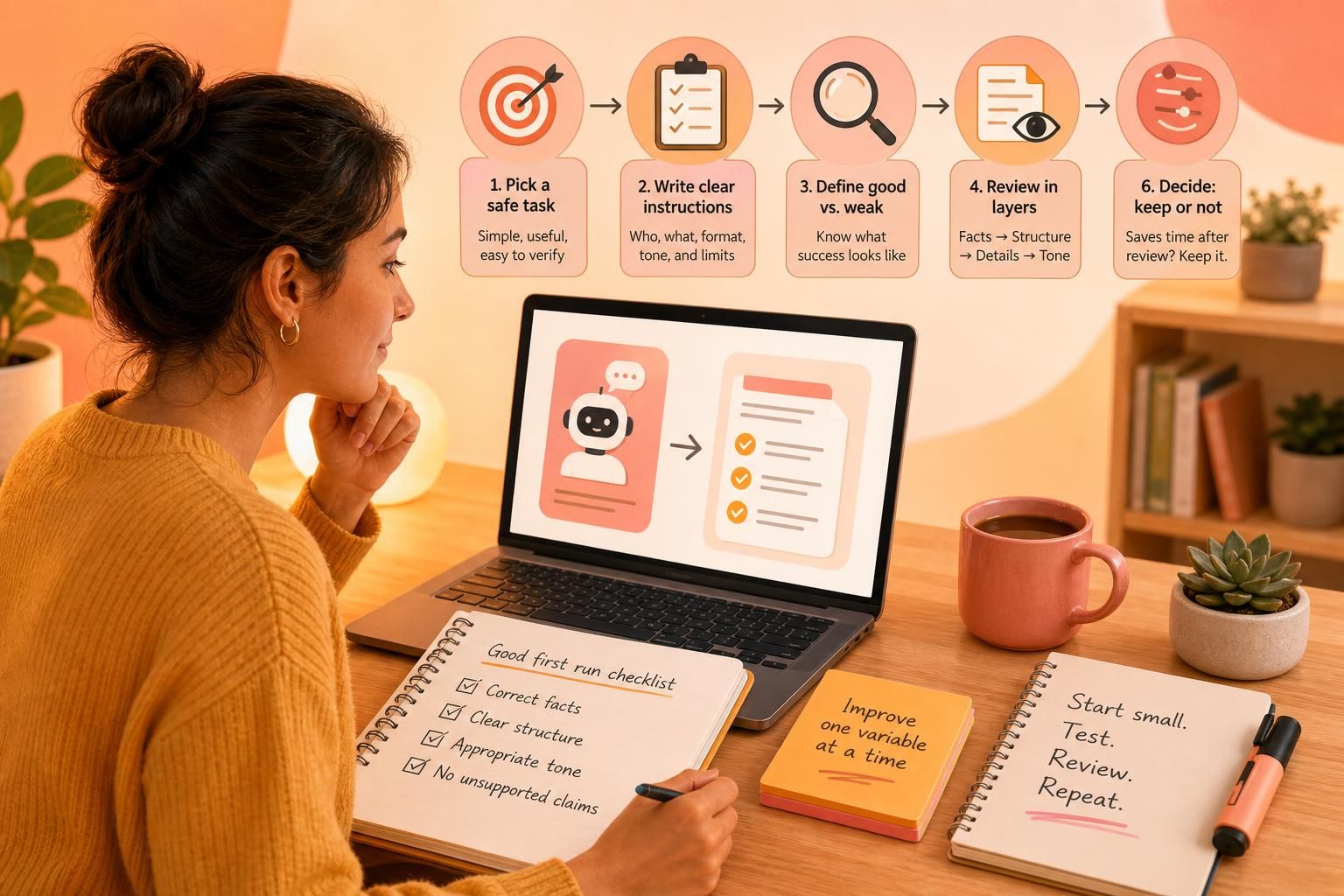
Step 1: Pick a safe task you already understand
Begin with work that is helpful but not critical. Short summaries, simple checklists, meeting-note cleanup, routine email drafts, and basic research lists are all reasonable starting points. The best first workflow is one where you already know the right answer or can verify it quickly. That makes the test meaningful without exposing you to unnecessary risk.

Example: You paste a rough meeting note and ask for a five-bullet action list. Because you were in the meeting, you can quickly confirm whether the bullets are accurate, complete, and in the right order.
Step 2: Write instructions like a checklist
Good beginner instructions are short, specific, and measurable. Tell the system who the output is for, what format you want, what tone you want, and what it must not do. If you want a summary, say whether it should focus on risks, decisions, or next steps. If you want research, name the categories or fields you expect to see. Clear instructions are not “prompt magic”; they are simply a way to make the workflow repeatable.
Example: “Summarize this note for a client in plain English. Keep it under 120 words. Include the three action items. Do not add any facts that are not in the note.”
Step 3: Define what a good first run should and should not look like
A strong first result is usually accurate, organized, and easy to reuse. A weak result is often generic, overly long, off-topic, or confident about details that were never provided. Beginners sometimes judge success too loosely because the output looks polished. That can hide important problems. A better check is a simple one: are the facts right, is the structure usable, is the tone acceptable, and are there any unsupported claims?
If the result sounds impressive but contains small factual errors, treat that as a warning rather than a win. A workflow is only useful if the review time is still lower than doing the task manually from scratch.
Step 4: Review output in layers
Start with factual accuracy. Then check the structure. Then look for missing details, awkward wording, or statements that go beyond the evidence you provided. If the workflow touches external content, look for relevance and duplication. If it produces something client-facing, check tone and brand fit before you even think about using it publicly.
Example: For a lead list, confirm that the business names, contact details, and notes all match. If the agent found the right companies but missed half the phone numbers, the workflow may still help with discovery but not with delivery.
Step 5: Improve one variable at a time
When a workflow misses the mark, change one thing first: the instruction, the input format, or the expected output shape. That makes it easier to learn what caused the issue. If you change everything at once, you will not know whether the improvement came from better guidance or from a different task altogether. Small adjustments create cleaner lessons and better repeatability.
Worked example: If an email draft is too vague, first make the audience more specific. If it is still vague, shorten the requested format. If it still misses the point, add one or two examples of the tone you want. That sequence teaches you more than changing five variables in one go.
Step 6: Decide whether the workflow is worth keeping
A workflow starts to look worth keeping when it repeatedly saves time, reduces mental clutter, or gives you a solid first draft you can safely refine. If you spend nearly as long correcting the output as you would have spent doing the work yourself, the workflow is not ready yet. That does not necessarily mean the tool is bad. It may mean the task is too advanced, the instructions are too loose, or the process needs another round of testing.
For a business-side lens on whether a setup deserves ongoing attention, the paying-for-worth framework can help you compare usefulness against your real usage pattern.
FAQs, Mistakes & Expert Insights
Common mistake: starting with high-risk work
Many beginners jump straight into client-facing, public, or sensitive tasks because those seem most valuable. That is usually the fastest way to create frustration. Start with something that is easy to verify and easy to undo. A first workflow should build trust and understanding, not pressure.
Common mistake: treating speed as the main metric
Fast output is not automatically good output. A workflow can save time and still require careful review. The real question is whether the process reduces your total effort after corrections. If you have to rewrite everything, speed by itself does not help much.
Common mistake: testing too many things at once
If you change the task, the format, the instructions, and the quality bar in the same test, you learn very little. Beginners get better results when they keep one workflow stable and then refine it gradually. That is how you identify what actually improved the outcome.
Nuanced insight: the best beginner workflow is often unglamorous
The most useful first use cases are usually simple and repetitive: notes, drafts, lists, summaries, and basic research organization. They are easy to inspect, easy to repeat, and easy to compare against your own standards. If a hosted AI agent handles those well, you can move toward more involved tasks with clearer expectations.
Nuanced insight: output quality depends on review quality
A hosted AI agent is only as useful as the review process behind it. If you never check the output carefully, weak assumptions and missing details can slip through. If you over-edit everything, you may erase the time savings. The practical middle ground is to verify the important parts, fix what matters, and decide whether the workflow truly helps.
Reader questions
What is the safest first workflow to test?
A small task you can verify line by line is usually safest, such as turning notes into an outline or summarizing a short internal document. The scope should be narrow enough that errors are easy to spot and easy to correct.
How do I know if the output is good enough?
Use a simple checklist: correct facts, clear structure, appropriate tone, and no unsupported claims. If the output meets your purpose with light editing, it may be useful. If it needs major rewriting, the workflow is not ready yet.
Should I test with client work right away?
Usually not. Start with noncritical or internal tasks first. Client-facing work adds pressure, and pressure makes it harder to judge whether the workflow itself is working.
What if the agent seems smart but makes small mistakes?
Take that seriously. Repeated small mistakes matter, especially in names, numbers, dates, and instructions. Tighten the task, reduce ambiguity, and retest before you trust it more broadly.
When does a test become a real workflow?
When it repeats with similar instructions, produces predictable output, and saves you time after review. At that point, you are no longer just experimenting; you are building a reusable process.
What is the safest first workflow to test?
A small task you can verify line by line is usually safest, such as turning notes into an outline or summarizing a short internal document. The scope should be narrow enough that errors are easy to spot and easy to correct.
How do I know if the output is good enough?
Use a simple checklist: correct facts, clear structure, appropriate tone, and no unsupported claims. If the output meets your purpose with light editing, it may be useful. If it needs major rewriting, the workflow is not ready yet.
Should I test with client work right away?
Usually not. Start with noncritical or internal tasks first. Client-facing work adds pressure, and pressure makes it harder to judge whether the workflow itself is working.
What if the agent seems smart but makes small mistakes?
Take that seriously. Repeated small mistakes matter, especially in names, numbers, dates, and instructions. Tighten the task, reduce ambiguity, and retest before you trust it more broadly.
When does a test become a real workflow?
When it repeats with similar instructions, produces predictable output, and saves you time after review. At that point, you are no longer just experimenting; you are building a reusable process.
Summary & Next Steps
Use simple workflows to judge fit, not hype
Beginner AI agent workflows are most useful when they are small, safe, and easy to verify. Choose a task you already understand, define success clearly, review the output carefully, and improve one variable at a time. If the system handles that well, you have a real signal that it may fit your work. If not, you have learned that quickly with limited risk.
For a broader framework on security and privacy questions, see security and privacy questions to ask before using a hosted AI agent. For the commercial evaluation of the product itself, return to the InstantlyClaw Premium review pillar. If you want to explore the product directly, you can visit InstantlyClaw Premium and start by testing one simple workflow before attempting anything more complex.

[…] see how these decisions affect first projects, the beginner workflow guide on simple workflows to test with a hosted AI agent system can help you match the tool to the […]
[…] InstantlyClaw Premium can be a starting point for understanding how a hosted setup works, but the same questions apply to any vendor. For more context on fit and setup tradeoffs, see how to tell whether a hosted AI agent setup is worth paying for, what a hosted AI agent setup usually includes, and beginner workflows you can test with a hosted AI agent system. […]