

 Commission disclosure: This review includes an affiliate link. If you buy through it, ProdifyDigital may earn a commission at no extra cost to you.
Direct Answer & Introduction
Quick verdict for the right buyer
ClipMagic is worth considering if you want caption automation and short-form repurposing in one desktop workflow, and you prefer a one-time payment over a recurring subscription. It is most relevant for independent creators, coaches, freelancers, and small businesses that already work with video and want a simpler way to add captions, create clips, and export polished assets. The main caution is that the offer needs to be read by entitlement, not by headline. The special deal page promotes a $67 lifetime option, while the official support centre also describes a separate lifetime-plus-Pro tier and subscription plans. So the real question is not just whether ClipMagic is inexpensive; it is whether the specific plan you receive covers the tasks you actually need.
This review helps you separate transcription, caption styling, clipping allowance, and Pro-gated features so you can decide whether the offer fits your workflow. If you want to evaluate it directly, start with the current purchase details and then compare them with the kind of videos you publish, the amount you repurpose, and how much manual review you are willing to do.
Who this review is for
This guide is for readers deciding whether caption automation belongs in an existing editing process. It is not a promise of reach, conversion, or viral lift. The useful outcome here is clarity: you should be able to tell which part of your workflow ClipMagic can plausibly help with, and which part still needs your judgment.
Fundamentals
What ClipMagic is in practice
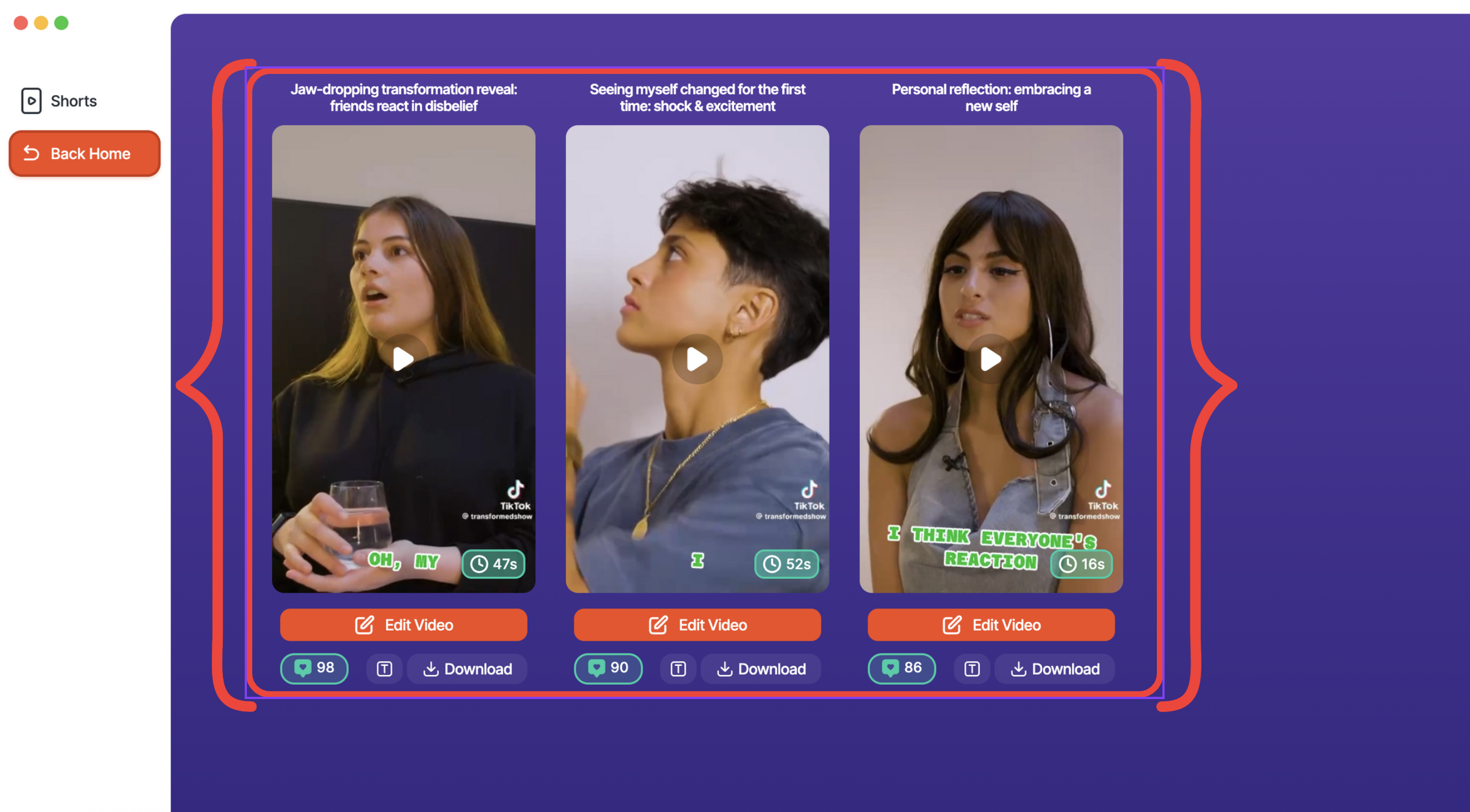
ClipMagic is positioned as a desktop tool for video captions and short-form clipping. The official deal page promotes unlimited AI captions, exports, 4K output, emoji-assisted captions, caption presets, and several clip, ad, and call-to-action templates. The getting-started help article describes a workflow where you import a video, let the system generate clip suggestions, review the results, then edit captions and supporting media before exporting or publishing. In plain terms, the product is not just a caption layer; it is a repurposing workflow with caption design attached.
Terms that matter before you compare plans
Lifetime access means a one-time payment rather than an ongoing subscription, but it does not automatically mean every feature in the product line is included. The official pricing help page distinguishes a basic $67 lifetime license from a $164 lifetime-plus-Pro option, and it also lists monthly and annual subscription plans. Unlimited captions on the sales page should be read as a claim about caption generation and export use, not a guarantee that every tool in every tier is unlimited. Clipping allowance is separate again: the offer states that the AI long-to-short clipping bonus is 10 hours, which is useful but still finite.
What the official sources support
The support documents checked on 21 September 2026 show caption editing, style changes, media additions, effects, and a clip-review workflow. They do not prove that every interface detail is identical for every buyer, and they do not prove that all Pro features come with the basic lifetime deal. The safest reading is therefore practical rather than promotional: ClipMagic appears designed for captioning and repurposing, but you still need to confirm the entitlement at checkout.
Main Process / Strategies
How to judge whether ClipMagic fits your workflow
Begin with the problem you actually need solved. If you already record usable audio and mainly need captions, the basic lifetime deal may be enough if it includes the features you use most. If you regularly turn long recordings into many short clips, the 10-hour AI clipping bonus becomes a real planning limit. If you need broader publishing tools, extra installations, or higher-tier functions, the support-centre tier structure suggests you should not assume the $67 option includes everything.
A useful way to assess the product is to separate its work into three layers: caption creation, clip creation, and caption presentation. Caption creation is the transcript-to-text step. Clip creation is the process of selecting or generating short excerpts from longer video. Caption presentation is the styling layer: presets, emojis, layout, and final visual polish. A buyer can be satisfied by one layer and disappointed by another, so the key is to identify your bottleneck before you compare price.
A hypothetical creator workflow
Imagine a solo coach who records a 45-minute webinar each week. She wants one replay file, three short social clips, and captions that are easier to skim on mobile. In that scenario, ClipMagic could reduce friction if it lets her import the webinar, review generated clips, adjust captions, and export the final assets in one place. But the decision is still conditional. If her main problem is exact transcript accuracy for technical terms, she still needs a proofreading step. If her main problem is choosing the strongest 30-second teaching moments, she needs the clipping workflow to be good enough for human review. If her main problem is brand consistency, she should check whether the caption presets and style tools are sufficient without moving into a higher tier.
That example shows why this product should be judged by task fit, not by a headline price alone. A one-time payment is only attractive if it covers the part of the workflow you actually use.
How to think about the offer boundaries
The deal page promotes unlimited captions, unlimited exports, 4K resolution, no watermarks, and no recurring fees. The official support page adds important context by separating basic lifetime, lifetime-plus-Pro, and subscription options. For a reader, that means the current offer should be treated as a specific entitlement, not as a universal statement about the entire platform. Before buying, confirm what the checkout includes today, especially if you need AI hook titles, call-to-actions, extra installations, or other functions named in the subscription help page.
If you are comparing pricing models, keep the comparison grounded. A subscription can make sense when you need a broader feature set and expect steady usage. A lifetime purchase can make sense when your needs are narrower and more predictable. Neither model is automatically superior; the better model is the one that matches your output volume, editing habits, and tolerance for feature limits.
Worked decision example
Suppose a small agency wants captions for client testimonials and occasional short clips from interviews. The buyer should ask four practical questions: Does the basic deal support the caption styles they need? Does the 10-hour clipping bonus cover their expected repurposing load? Does the desktop app fit their devices and workflow? And if they later need Pro features, what changes in the entitlement? If those answers are positive, the $67 entry point may be attractive. If not, the buyer should not stretch the basic tier beyond what it actually covers.
The same logic works for a solo creator publishing a few videos a month. In that case, the main benefit is not “unlimited everything”; it is lower friction. The software is most compelling when it reduces repetitive caption work without forcing a subscription into a workflow that does not need one.
For readers who want a deeper cost comparison, the relevant next question is whether lifetime software or recurring subscriptions make more sense for the volume and length of video you produce. That question belongs alongside this review because the real decision is usage math, not marketing language.
If you want to compare the purchase model more carefully, the companion lifetime caption software cost guide is the most useful next step. If your current issue is keeping spoken meaning accurate, the caption proofreading guide is the better next read. If your bottleneck is visual clarity, the readable caption styles guide helps you judge presentation. If you mainly want repurposing help, the short-clips guide explains how to preserve context. And if your CTA needs to match the clip, the CTA-fit guide is the right companion article.
FAQs, Mistakes & Expert Insights
Common mistakes to avoid
The biggest mistake is assuming the marketing headline and the actual entitlement are the same thing. The deal page is promotional, while the support centre shows a tiered product structure. Another common mistake is treating “unlimited captions” as a promise about every function, including clipping hours and higher-tier tools. A third is skipping the workflow check: if you need manual proofreading, brand styling, or clip review, make sure the tool supports those steps comfortably rather than assuming the automation will replace them.
Another misconception is that a desktop app automatically solves every reliability issue. Desktop operation may be convenient, but it does not prove offline AI performance for every feature or every machine. It simply means the product runs on desktop rather than being a purely cloud-based tool. Likewise, animated captions can improve presentation, but they do not guarantee accessibility compliance or wider reach.
What the evidence supports, and what it doesn’t
The official pages support a narrow, useful conclusion: ClipMagic is built for captions, clipping, styling, and repurposing video in a way that may suit creators who want a one-time purchase. They do not support broader claims such as guaranteed viral reach, universal productivity gains, or identical results for every user. The most defensible review position is therefore conditional: it can be useful for the right workflow, but the exact entitlement and clipping allowance matter.
Five reader questions
Is ClipMagic mainly for captions or for clipping too? It is positioned as both. The deal page emphasises unlimited captions, while the support guide shows a workflow that includes generating and editing short clips from longer videos. If your main need is only captioning, the basic tier may be enough; if clipping is central, check the included hours and entitlement carefully.
Does the $67 lifetime deal include every Pro feature? No source provided here supports that claim. The support centre explicitly distinguishes a basic lifetime license from a lifetime-plus-Pro option and from subscriptions. The safest step is to confirm the current checkout entitlement before purchase.
Is the 10-hour clipping bonus unlimited? No. The supplied evidence says the AI long-to-short clipping bonus is 10 hours. That is useful, but it is still a finite allowance and should be planned as such.
Do I still need to proofread captions if the tool is automated? Yes, if accuracy matters. Automation can speed up the first draft, but names, numbers, punctuation, and technical language still deserve a human check, especially when the content is client-facing or brand-sensitive.
Who is the best-fit buyer for ClipMagic? The best fit is usually a creator, coach, freelancer, or small business that wants caption automation and some repurposing help without a recurring fee. It is less compelling if you need every advanced feature in the broader product line or if your workflow depends on a much larger clipping allowance.
Is ClipMagic mainly for captions or for clipping too?
It is positioned as both. The deal page emphasises captions, while the help documentation shows a workflow that includes generating and editing short clips from longer videos. If your main need is just captioning, the basic tier may be enough; if clipping is central, check the included hours and entitlement carefully.
Does the $67 lifetime deal include every Pro feature?
No source provided here supports that assumption. The official support page distinguishes a basic lifetime license from a lifetime-plus-Pro option and from subscriptions, so the safest step is to confirm the current checkout entitlement before purchase.
Is the 10-hour clipping bonus unlimited?
No. The supplied evidence says the AI long-to-short clipping bonus is 10 hours. That is useful, but it is still a finite allowance that should be planned as a limit rather than treated as unlimited.
Do I still need to proofread captions if the tool is automated?
Yes, if accuracy matters. Automation can speed up the first draft, but names, numbers, punctuation, and technical language still deserve a human check, especially when the content is client-facing or brand-sensitive.
Who is the best-fit buyer for ClipMagic?
The best fit is usually a creator, coach, freelancer, or small business that wants caption automation and some repurposing help without committing to a recurring fee. It is less compelling if you need every advanced feature in the broader product line or if your workflow depends on a much larger clipping allowance.
Summary & Next Steps
Bottom line for decision-makers
ClipMagic is a reasonable option for readers who want a one-time purchase for caption-focused video work and some short-form repurposing help. The strongest case for it is practical rather than dramatic: fewer repetitive caption tasks, a defined desktop workflow, and a pricing structure that may suit lighter or moderate use.
The main caveat is entitlement. The official deal page and the support centre do not describe the offer in exactly the same way, so your decision should be based on the exact package you will receive, not the broadest marketing claim. That matters most if you need clipping beyond the included bonus or if you expect Pro-level functions.
Best next step
If your workflow is caption-first and you want to check the current offer, review the purchase details through the ClipMagic review link and compare them against your editing needs. If you are still deciding, use the cluster guides to isolate the part of the workflow that matters most: proofreading, readability, clipping, CTA fit, or cost model. That will tell you whether ClipMagic solves your real bottleneck or simply looks convenient on the sales page.
Explore ClipMagic to check the current options against your requirements.
