

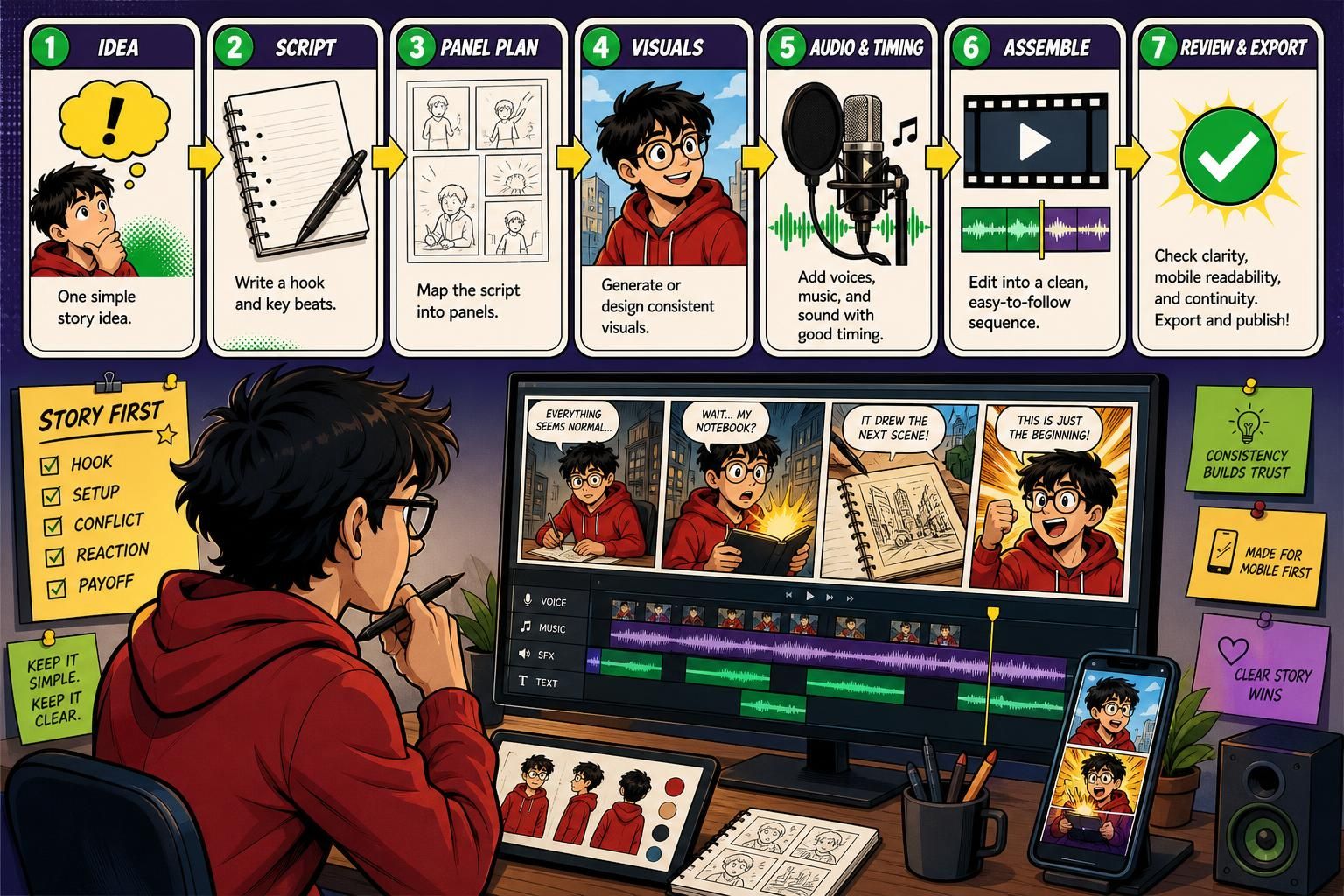
Direct Answer & Introduction
If you want to create comic-style AI videos, the beginner-friendly approach is to start with one simple idea, turn it into a short script, map that script into panels, generate or assemble consistent visuals, then finish with voices, captions, music, and a quality check. This guide is for beginners, faceless creators, marketers, and small teams who want a practical workflow without assuming any one app or platform. The goal is a short video that feels clear, coherent, and repeatable instead of random images stitched together.
Commission disclosure: This article includes a contextual affiliate link to Comic Videos AI; if you choose to buy through it, ProdifyDigital may earn a commission. The workflow advice below is tool-agnostic and remains useful whether you use Comic Videos AI or a different stack.
What this guide helps you do
Most beginners struggle with the same three things: shaping a story for short-form video, keeping characters visually consistent, and making the finished clip understandable on a phone. A good workflow breaks those problems into smaller steps so you can review each part before publishing. If you want help choosing when comic-style video makes sense compared with other formats, see faceless short-form content strategy.
Fundamentals
What a comic-style AI video is
A comic-style AI video is usually a short, panel-based video that uses illustrated scenes, dialogue or narration, captions, sound design, and a distinct visual identity. It is not just a slideshow with music. The comic feel comes from sequence, repeated character traits, and a pacing style that helps viewers follow the story quickly.
The essential parts of the workflow
The basic workflow has five parts: concept, script, panel plan, visual generation or assembly, and final export. Think of them as a chain. If one part is weak, the finished video feels uneven. The concept decides what happens. The script decides what is said. The panel plan turns that script into scenes. The visual step creates the look. The export step combines the elements into something ready to publish.
Why continuity matters more than complexity
Beginners often assume they need more effects, more motion, or more panels. In practice, continuity matters more than complexity. If the same character changes face, clothing, or proportions from panel to panel, viewers notice the break in consistency before they notice any visual polish. A simple story with stable visuals usually reads better than a complicated one that feels chaotic.
Planning for short-form viewing
Comic-style videos are usually watched in fast-scrolling feeds, so the story has to make sense quickly. That means the hook should arrive early, the conflict should be obvious, and the payoff should be easy to read even if someone only catches part of the clip. For a beginner, one central idea per video is far easier to execute than trying to squeeze in several subplots.
Main Process / Strategies
Step 1: Choose a story idea that fits the format
Start with a situation that can be told visually and quickly. Good beginner ideas include a misunderstanding, a mini transformation, a funny reaction, a simple challenge, or a small dramatic twist. Avoid concepts that depend on long explanations or subtle dialogue. If you can describe the whole premise in one sentence, it is usually workable.

Example: “A shy student discovers that the notebook they bought starts drawing the next scene before it happens.” That premise is short, visual, and easy to split into panels.
Step 2: Write a hook-first script
For a short comic video, the opening should tell viewers why they should keep watching. A hook can be a question, a strange image, a problem, or a promise of a reveal. After the hook, write the story in simple beats: setup, tension, reaction, payoff. Keep dialogue short. Comic videos do not need essay-length narration; they need lines that can be read and heard quickly.
Each line should do one job. One line can introduce the problem, another can raise the stakes, and another can deliver the twist. If a line does not move the story forward or help the viewer understand the scene, cut it.
Step 3: Break the script into panels
Panel planning is where beginners often save the most time later. A panel list tells you exactly what must appear in each frame: who is there, what they are doing, what emotion they show, and what the background suggests. It also reveals whether the idea is too crowded. If your story needs 18 panels to make sense, it may be too much for a first short.
A practical beginner structure is: 1) hook panel, 2) setup panel, 3) complication panel, 4) reaction panel, 5) payoff panel. You can add more panels later, but this five-beat structure is a clean place to start.
Step 4: Build the visuals with continuity in mind
Whether you use image generation, illustration tools, or a mixed workflow, define the character traits before creating the panels. Note the hairstyle, clothing, age range, color palette, and any distinctive accessory. Repeat those details in every prompt or art brief so the character stays recognizable. For scenes with multiple characters, keep each one visually distinct through color, silhouette, or style cues.
If you are creating panels from prompts, keep the character description consistent and change only the action, angle, or emotion. That reduces drift. If you are using source photos or original art, make sure the input is stable and that you have the rights to use it. The aim in a beginner workflow is not perfect cinematic art; it is dependable recognition.
Example: If your hero wears a red hoodie and round glasses, keep those elements unchanged unless the story specifically calls for a costume change. That one habit makes the sequence feel more professional.
Step 5: Add voices, timing, and sound deliberately
Once the visuals are ready, decide how the story should sound. You do not need a voice for every tiny action, but you do need clear audio choices. If possible, give speaking characters distinct voices, and keep the delivery aligned with each character’s role. Add music that supports the mood instead of competing with the narration. Sound effects should underline key moments, not crowd every second.
Timing matters too. A panel held too briefly may be unreadable; a panel held too long can feel static. As a rule of thumb, match screen time to the amount of text and emotional weight in the frame. If viewers need more time to read, give them more time.
Step 6: Assemble the video into a clean sequence
Your final assembly should make the story easy to follow from start to finish. Put the hook first, then the panel sequence in order, then any ending beat or call to action. Keep transitions simple. A few clean cuts or subtle motion often work better than heavy effects, especially for beginner work.
Before export, watch the video once with sound off and once with sound on. If it only works in one mode, it needs another revision. Short-form viewers often scroll with audio muted, so captions and visual clarity are part of the core design, not extras.
Step 7: Run quality, accessibility, and publishing checks
Do a final check for four things: legibility, continuity, audio balance, and mobile readability. Text should be large enough to read on a phone. Important actions should still be visible at thumbnail size. The main idea should make sense even if a viewer starts halfway through. If you use captions, keep them concise and avoid covering the screen with text.
Accessibility helps both reach and usability. Clear captions support viewers who watch without sound. High contrast between text and background helps low-vision users. A stable reading order helps everyone. For repeatable publishing, keep a checklist so each new video gets a little easier to produce.
A simple beginner template
Here is a reusable workflow: pick one idea, write a six-line script, split it into five to seven panels, define character traits, generate or design the visuals, add voice and music, then check readability and continuity before export. This is enough to make a first version without overcomplicating the process.
If you later want help deciding where this format fits in a wider content plan, return to faceless short-form content strategy.
FAQs, Mistakes & Expert Insights
Common mistakes to avoid
One common mistake is overloading the story with too many panels. Beginners often try to fit a full scene into a short video and end up with a slow, confusing clip. Another mistake is changing the character design from panel to panel. Even small differences can make the video feel less polished. A third mistake is ignoring captions or using text that is too small to read on mobile.
Creators also underestimate pacing. If every panel uses the same duration, the story can feel flat. Important moments deserve a little breathing room, while transitions can move faster. A fourth mistake is treating the visuals as the whole product. In reality, the script, timing, and audio design matter just as much as the artwork.
Misconceptions about automation and quality
A useful misconception to correct is that comic-style AI videos are fully automatic. Even when tools reduce the manual workload, the creator still has to choose the story, review the visuals, correct inconsistencies, and shape the final sequence. Technology can reduce effort, but it does not replace judgment. Assuming otherwise usually leads to generic clips.
Another misconception is that more style options automatically mean better results. Style variety is useful only if it supports the story. A noir look may suit a mystery, while a bright cartoon style may work better for a playful family moment. Style should support viewer comprehension first.
Evidence-supported insights for better output
Short-form viewing habits reward quick clarity, which is why clean hooks, readable captions, and consistent character design matter so much. That does not mean every successful video follows the same formula, but it does mean beginners should prioritize comprehension before experimentation. In practical terms, a simple video that reads clearly is usually a better first win than a more ambitious one that leaves viewers confused.
Repeatability is another important insight. If you can produce one good video, a second one with the same structure becomes easier. Over time, a repeatable workflow matters more than one impressive output. That is why a checklist, template, and style guide help beginners move faster without losing quality.
Practical judgment: if your first few videos take too long, simplify the concept rather than forcing more automation into the process. The right workflow is the one you can actually repeat.
Five reader Q&As
How long should a beginner comic-style AI video be?
Long enough to tell one clear idea, but short enough that the pacing stays tight. For beginners, a short format with a small number of panels is usually easier to manage than a more elaborate sequence.
Do I need animation skills?
No. The workflow here is built around planning, panel structure, and assembly rather than hand-drawn animation. What you do need is enough visual judgment to keep the story clear and consistent.
What matters more: art quality or story clarity?
Story clarity. Viewers usually forgive simple art faster than they forgive a confusing video. Strong structure and readable captions often matter more than extra visual detail.
Can I use one workflow for different niches?
Yes, but the story idea, tone, and style should match the audience. A playful family clip, a product demo, and a suspense scene may use the same workflow, but they should not share the same pacing or visual tone.
What should I improve first if my video feels weak?
Start with the script and panel plan. If the story is unclear, no amount of editing polish will fully fix it. Once the structure works, improve timing, captions, and visual consistency.
How long should a beginner comic-style AI video be?
Long enough to tell one clear idea, but short enough that the pacing stays tight. For beginners, a short format with a small number of panels is usually easier to manage than a more elaborate sequence.
Do I need animation skills?
No. The workflow here is built around planning, panel structure, and assembly rather than hand-drawn animation. What you do need is enough visual judgment to keep the story clear and consistent.
What matters more: art quality or story clarity?
Story clarity. Viewers usually forgive simple art faster than they forgive a confusing video. Strong structure and readable captions often matter more than extra visual detail.
Can I use one workflow for different niches?
Yes, but the story idea, tone, and style should match the audience. A playful family clip, a product demo, and a suspense scene may use the same workflow, but they should not share the same pacing or visual tone.
What should I improve first if my video feels weak?
Start with the script and panel plan. If the story is unclear, no amount of editing polish will fully fix it. Once the structure works, improve timing, captions, and visual consistency.
Summary & Next Steps
To create comic-style AI videos as a beginner, keep the workflow small: one idea, one hook, one character set, one panel sequence, and one final export. The more repeatable your process is, the easier it becomes to produce videos that feel coherent and usable. If you want to decide how this format fits into a broader publishing plan, continue with faceless short-form content strategy.
If you are comparing tools after understanding the workflow, the product-focused overview is in the Comic Videos AI review. For most beginners, the priority is not buying every feature; it is learning the structure that makes these videos understandable, accessible, and worth watching.
Comic Videos AI may be one way to speed up parts of that process, but the bigger lesson is tool-agnostic: strong comic-style videos come from clear planning, consistent visuals, and careful review before publishing.

[…] content job truly needs it. For readers exploring the comic route in more detail, the related guide How to Create Comic-Style AI Videos: A Beginner’s Workflow Guide covers the production side, while Comic Videos AI Review: Is the Front-End App Worth It for […]