

Commission disclosure: This educational guide may include a promotional link to Traffic Magnets. The purpose here is to explain the traffic-tool-page model clearly, not to promise results or overstate what any platform can do.
If you want a simpler way to understand search-driven traffic than publishing constant blog posts, a traffic tool page is a useful concept to learn. It is a focused page built around an action people already want: calculate, check, compare, generate, or estimate something quickly. For beginners, the goal is not to chase trends. It is to build one useful page that matches a real search need, is easy for people to use, and gives search engines enough context to understand what the page does. This guide shows you the basics, the planning steps, the common mistakes, and how to judge whether a tool-page idea is worth building.
Direct Answer & Introduction
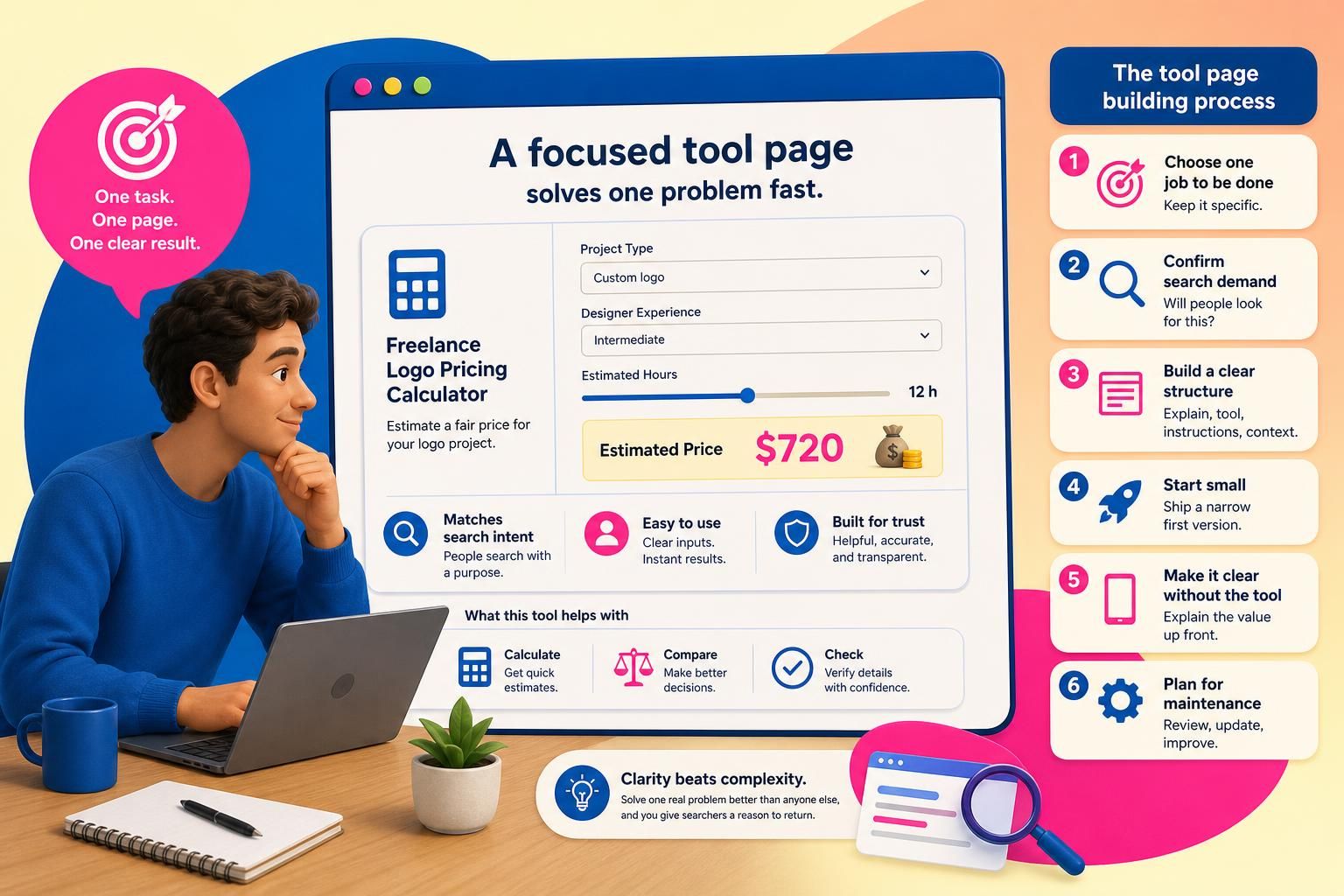
A traffic tool page works by combining a specific user task with a search query. Instead of trying to rank a broad article, you create a page centered on one narrow job: a calculator, checker, generator, estimator, or lookup aid. When the page is genuinely helpful and clearly structured, it can attract searchers who already have that need and are looking for a quick answer.
Who this is for
This guide is for beginners, site owners, affiliates, creators, and small businesses that want a search-driven asset without building a large content site first. It is especially helpful if you want something more durable than social posts, but more focused than a full publishing program.
The outcome to aim for
The ideal outcome is a page that makes one problem easier to solve. The page should be understandable on its own, usable on mobile, and clear enough that a visitor can see the value quickly. You are not trying to impress people with complexity; you are trying to remove friction.
If you want a broader commercial overview of one implementation approach, see the Traffic Magnets review. If you are still choosing a topic, the companion guide on how to choose a low-competition tool idea for organic traffic can help you narrow the subject before you build.
Fundamentals
What a traffic tool page is
A traffic tool page is a standalone page built around an action or decision. The visitor enters something, receives something back, or checks something quickly. The page is usually designed around a repeatable search need rather than a general subject area.
Why search intent matters
Search intent is the reason behind the query. A person searching for a tool often wants speed, clarity, or a shortcut to a decision. Your page should reflect that intent immediately. If the visitor wants to estimate, compare, or verify, the page should help them do that before adding extra explanation.
What makes the page understandable to search engines and people
Search engines need readable text, a clear title, sensible headings, and enough context to understand the page. People need the same thing in a different form: a plain description of what the page does, who it is for, and what they get from using it. A bare widget with no explanation is usually weaker than a tool page that is framed clearly.
Useful principle: clarity beats complexity
Beginners often assume a better tool must be more advanced. In practice, a simple page that solves one task cleanly is often easier to use, easier to explain, and easier to improve. The job is not to create the biggest tool. The job is to create the clearest one for a specific need.
Main Process / Strategies
Step 1: Choose one job to be done
Start with a single question a visitor might ask. Good tool-page ideas usually map to a simple task such as calculating, comparing, estimating, or checking. The tighter the task, the easier it is to shape the page around the visitor’s intent.

Example: A broad “business calculator” is hard to position because it does too much. A “freelance logo pricing calculator” is easier to understand because the visitor, the problem, and the outcome are all more specific.
Step 2: Decide whether the topic has practical search demand
You do not need huge search volume to make a tool page worthwhile, but you do need a topic people actually look for. The best ideas are repeated, practical, and suited to a fast answer. If the topic is too obscure, few people will need it. If it is too broad, the competition and content burden grow quickly.
Example: A general startup idea generator may be too wide. A startup naming tool for pet services is narrower and easier to frame because it serves a more defined audience and use case.
Step 3: Build a structure that matches the query
A strong tool page usually follows a simple sequence: a direct explanation of the tool, the tool itself, a short set of instructions, and a little context that helps people and search engines understand why the page exists. Do not bury the interactive part under a long introduction.
Helpful page structure often includes:
- a title that names the task clearly;
- a short intro that confirms the benefit;
- the tool near the top of the page;
- supporting text that explains use cases and limitations;
- a short FAQ or notes section if the topic needs clarification.
Step 4: Keep the first version small
Beginners often want to add too many features before the page has even been published. That can blur the intent and delay useful feedback. A narrow first version is usually easier to test, easier to explain, and easier to improve honestly.
Example: If you are building a savings calculator, start with one scenario, such as monthly contributions over time. If people use it and understand it, you can add more modes later.
Step 5: Make the page understandable without the tool
Visitors should still know what the page does even if the interactive part loads slowly or they arrive from a different device. That means using clear headings, concise explanatory text, and a short description of the result. This also supports accessibility and makes the page more resilient for search.
Step 6: Plan for maintenance
A traffic tool page is not truly set-and-forget. Even simple pages benefit from occasional checks: does the tool still work, does the copy still match the search intent, and does the page load well on mobile? Low-maintenance is realistic; zero-maintenance is not.
How to judge a tool-page idea before you build it
A simple evaluation framework is to ask three questions:
- Is the task specific? If not, the page may be too broad.
- Would someone search for this? If not, the page may be too novel or too niche.
- Can the tool give a fast, obvious result? If not, the page may feel more confusing than useful.
If the answer is yes to all three, the idea is worth exploring. If one answer is weak, refine the concept before you build.
FAQs, Mistakes & Expert Insights
Common beginner mistakes
1) Making the topic too broad. A wide topic creates vague pages that are hard to understand and harder to position. Narrow the task until the visitor’s purpose is obvious.
2) Hiding the value. If people cannot see what the page does within a few seconds, they may leave before using it.
3) Treating the tool like a gimmick. A useful page should solve a real problem, not just look clever or different.
4) Skipping context. Without a few explanatory lines, the page can be harder to interpret for both users and crawlers.
5) Publishing and never checking it again. Even simple pages should be reviewed for broken logic, outdated wording, and mobile usability.
Nuanced insight: utility and visibility are related, but not identical
A useful tool page can earn attention because it solves a problem quickly, but usefulness alone does not guarantee discovery. Search visibility also depends on topic fit, page clarity, technical quality, and competition. It is better to think in probabilities than certainties.
Nuanced insight: smaller can be stronger
Many people assume the best page is the one with the most features. In reality, a small page that answers one high-intent question can be more effective than a large tool that confuses the visitor. Simplicity often helps both usability and editorial focus.
FAQ 1: What is the simplest version of a traffic tool page?
The simplest version is one page, one task, one clear result. Add only the explanation needed to help a user understand and use the tool. A minimal but useful page is often better than a feature-heavy page that is hard to explain.
FAQ 2: Do traffic tool pages need a lot of content?
They need enough content to explain the purpose, usage, and context of the tool. They do not need a long article stuffed with keywords. A concise, helpful page with clear headings is usually more aligned with user intent than a padded one.
FAQ 3: Can a tool page work in any niche?
Many niches can support a tool page, but not every topic is equally suitable. The best candidates usually involve repeatable questions, comparisons, estimates, or checks. If the task cannot be simplified into a useful interaction, a tool page may not be the right format.
FAQ 4: How do I know if my idea is too competitive?
If the query is dominated by large brands, broad informational hubs, or highly established calculators, it may be difficult for a beginner to compete directly. Narrowing the subject, audience, or use case can make the idea more realistic.
FAQ 5: What should I watch after publishing?
Check whether the page loads correctly, whether the tool behaves as expected on mobile, and whether the copy still matches the search intent. Early feedback usually comes from user behavior, not assumptions, so review the page with a critical eye.
What is the simplest version of a traffic tool page?
The simplest version is one page, one task, one clear result. Add only the explanation needed to help a user understand and use the tool. A minimal but useful page is often better than a feature-heavy page that is hard to explain.
Do traffic tool pages need a lot of content?
They need enough content to explain the purpose, usage, and context of the tool. They do not need a long article stuffed with keywords. A concise, helpful page with clear headings is usually more aligned with user intent than a padded one.
Can a tool page work in any niche?
Many niches can support a tool page, but not every topic is equally suitable. The best candidates usually involve repeatable questions, comparisons, estimates, or checks. If the task cannot be simplified into a useful interaction, a tool page may not be the right format.
How do I know if my idea is too competitive?
If the query is dominated by large brands, broad informational hubs, or highly established calculators, it may be difficult for a beginner to compete directly. Narrowing the subject, audience, or use case can make the idea more realistic.
What should I watch after publishing?
Check whether the page loads correctly, whether the tool behaves as expected on mobile, and whether the copy still matches the search intent. Early feedback usually comes from user behavior, not assumptions, so review the page with a critical eye.
Summary & Next Steps
Traffic tool pages work best when they are specific, useful, and easy to understand. The basic formula is simple: choose one search-driven task, build one focused page, explain it clearly, and keep the first version small enough to publish and maintain. That will not guarantee traffic, but it gives you a sensible framework for creating an asset that has a real chance to be found and used.
What to do next
If you are still shaping your idea, start with the companion guide on choosing a low-competition tool idea. If you want to compare this educational framework with one commercial implementation later, revisit the Traffic Magnets review after you have a clearer sense of the model.
A practical next step is to write down three possible tool-page ideas, score each one for specificity and likely search intent, and choose the simplest idea that still solves a real problem. That is usually the best place for a beginner to begin.
Explore Traffic Magnets to check the current options against your requirements.

[…] readers comparing approaches, it may help to explore how traffic tool pages work and how to choose a low-competition tool idea before deciding whether this workflow suits your […]
[…] This guide answers one question: how do you choose a low-competition tool idea for organic traffic? For the broader context, see Traffic Magnets Review: Who It’s For, What It Does, and Where It Falls Short. If you want a wider traffic-asset primer, see How Traffic Tool Pages Work: A Beginner’s Guide to Search-Driven Traffic Assets. […]