

Quick answer
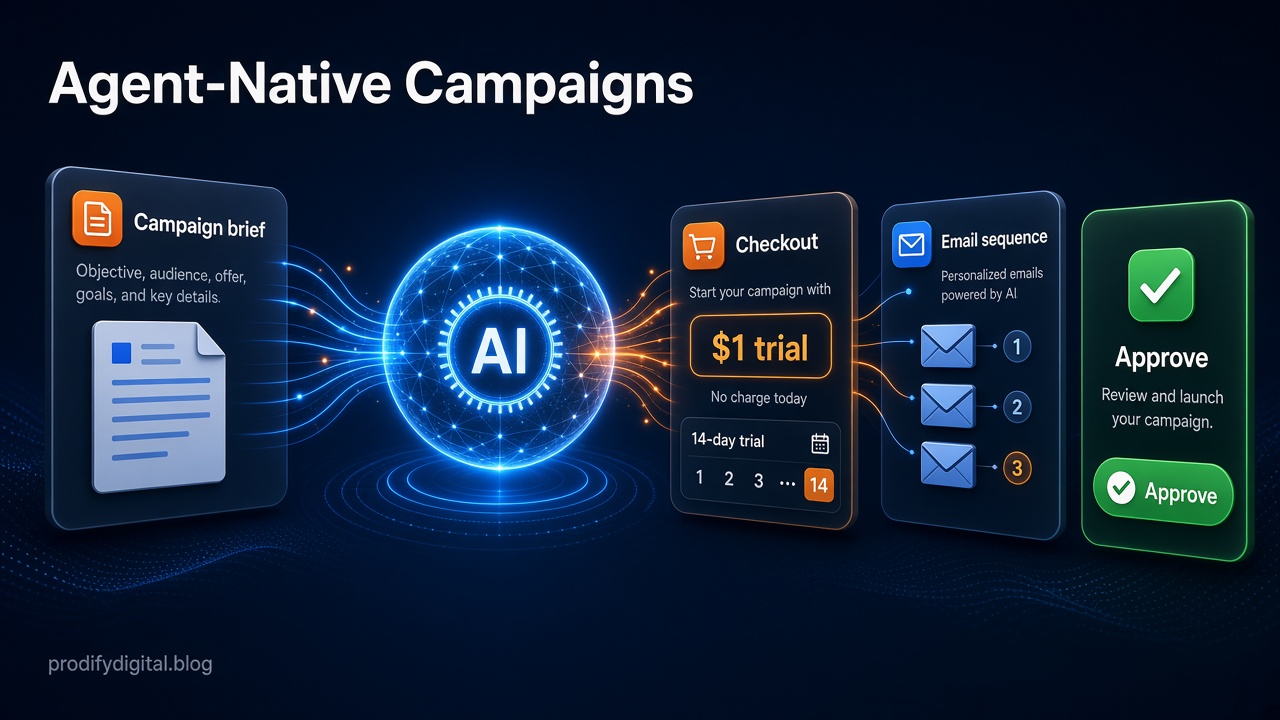
In this Scale.gg review, the key idea is that Scale.gg is agent-native: you describe the campaign you want and its agent drafts the offer, funnel, checkout path, affiliate message and follow-up emails as one working brief. Nothing goes live automatically, so you review checkout steps, audience, terms and sends before approving them.
Key takeaways
- Scale.gg starts with the offer, not the checkout page
- The agent drafts funnel, checkout, affiliate message and follow-ups as one working brief
- Nothing goes live automatically: you approve checkout, terms and sends
- Trial and renewal wording is checked for consistency before publishing
In this guide
- Watch: the source video
- What does “agent-native” mean in Scale.gg?
- Does Scale.gg publish anything without your approval?
- How does Scale.gg handle email with Mailbaser?
- How does Scale.gg handle trials and recurring payments?
- Who is Scale.gg best for?
- How should you test Scale.gg on your first campaign?
- Frequently asked questions
- The bottom line
🛠️ Practical guides
Ready to put this into practice? These step-by-step guides answer two common follow-up questions:
Most campaign tools make you start in the plumbing: build the checkout page, wire up the email platform, then work out the billing rules. Scale.gg flips that order.
In our latest video, we walked through how its agent-native approach works in practice. This article turns that walkthrough into a practical guide, with the parts we think matter most for marketers, creators and affiliates.
Disclosure: Prodify Digital offers a Scale.gg bonus bundle and may earn a commission if you buy through our links. This does not change our assessment.
Watch: the source video
What this video covers: In our latest video we walk through Scale.gg's agent-native campaign builder, the Mailbaser email workflow and how it maps a $1 trial into recurring billing.
Video: our Scale.gg walkthrough on the Prodify Digital YouTube channel. Features are described as shown at the time of recording.
What does “agent-native” mean in Scale.gg?
It means the AI agent is the starting point, not an add-on. Instead of opening a checkout builder, you give the agent a plain-English instruction such as “outline a campaign for my $1 trial”.
From that one request, the agent maps out:
- The overall campaign and funnel
- The checkout path
- The affiliate message
- Buyer follow-ups and terms
It puts all of this into one structured working brief. That is the big difference from tools that just generate random marketing copy: you get a draft of the whole campaign that you can review and edit.
Does Scale.gg publish anything without your approval?
No. As we covered in the video, nothing goes live automatically. You review the checkout steps, buyer follow-ups and terms before anything is published.
💡 Tip: Treat the agent's brief as a first draft. Read the checkout path and terms yourself before approving.
That matters. An agent that understands payment logic and campaign flows can save a lot of setup time, but you still want a person signing off anything that takes money or emails customers.
If you are building your own review process, our guide to human approval checkpoints in AI workflows explains where to put them.
How does Scale.gg handle email with Mailbaser?
Mailbaser is the email side of the workflow. In the video example, we wanted to follow up with last month's launch buyers.
What the agent does
- Inspects your real audience data.
- Suggests a specific segment, such as last month's buyers.
- Drafts a three-email follow-up sequence.
- Runs a sender readiness check.
- Shows you the audience and a send checklist before anything goes out.
You review the content and approve the send. You keep control of your list while skipping the repetitive technical setup.
Once your sequences are live, it is still worth checking them regularly. Our email automation health check is a simple routine for that.
How does Scale.gg handle trials and recurring payments?
Billing is where launches often go wrong, especially with trials. In the video we used the example of a 14-day $1 trial that converts into a recurring payment.
Scale.gg maps the whole path in plain English before you publish, including:
- The customer-facing terms
- Renewal notices
- A comparison of the trial promise, checkout copy, renewal language and follow-up emails, so they all say the same thing
That last check is valuable. Mismatched trial wording between a sales page, checkout and emails is a common cause of refunds and complaints.
⚠️ Warning: Always make sure trial length, price and renewal terms match across your sales page, checkout and emails.
Which payment types are supported?
| Payment type | What Scale.gg handles (as shown in our video) |
|---|---|
| One-time payments | Standard single purchase |
| Instalments | Split payments |
| Multi-tier subscriptions | Several recurring levels |
| Trials | Low-cost trial converting to recurring |
| Extras | Custom receipts and billing portal handoffs |
Planning your first Scale.gg campaign? Start with one simple offer and let the agent build the full brief before you touch checkout.
Who is Scale.gg best for?
Based on what we showed, Scale.gg suits:
- Beginners who want guided, step-by-step campaign setup
- Product creators launching offers with trials or subscriptions
- Affiliate marketers and promoters who need the offer, checkout and affiliate message to line up
- Small teams who want less manual setup without handing over control
If you are comparing it with other tools, run it through our checklist for evaluating an AI product before you buy.
How should you test Scale.gg on your first campaign?
- Start with one simple offer, not your whole product range.
- Ask the agent for a full campaign brief and read it end to end.
- Check the checkout path and trial terms yourself, line by line.
- Review the suggested email segment and the three drafts before approving.
- Run a test purchase if you can, and check the receipt and renewal notice.
- Only then approve the launch.
Want a head start with Scale.gg? See our Scale.gg Starter Bonus Bundle, six resources to help you plan and launch your first campaign, and find more guides on Prodify Digital.
Frequently asked questions
What is Scale.gg?
Scale.gg is a membership platform of AI-powered marketing apps built around an agent you direct in plain English to plan campaigns, checkouts, emails and billing.
Does Scale.gg send emails automatically?
Not without approval. The agent drafts the sequence and runs a sender check, but you review the audience and content and approve the send.
Can Scale.gg set up a $1 trial?
Yes. In our video we used a 14-day $1 trial that converts to a recurring payment, with terms and renewal notices mapped out before publishing.
Do I need technical skills to use Scale.gg?
No. You give instructions in plain English and the agent handles the structured setup for you to review.
What is Mailbaser?
Mailbaser is the email part of the Scale.gg workflow that segments your audience, drafts follow-ups and checks sender readiness.
The bottom line
Scale.gg's agent-native approach lets you shape the whole offer first and leave the repetitive setup to the agent, while you stay in charge of every checkout, term and send. Start with one campaign, review everything, and build from there.
Related posts
- How to Add Human Approval Checkpoints to AI Workflows
- Create an Email Automation Health Check Before Journeys Quietly Break
- How to Evaluate an AI Product Before You Buy: A Practical Checklist

[…] an agent-led marketing workflow? Our Scale.gg review shows how an agent-native campaign tool handles checkout, email and […]
[…] our earlier Scale.gg review we focused on the agent-native brief: checkout paths, Mailbaser email and trial billing. This […]