

Commission disclosure: This educational guide includes a promotional link to ShopEmpire. The guidance below is independent, and the link is included only as one example tool readers can inspect after learning how to compare options.
If you are trying to choose an AI product video tool, the real issue is not whether the software sounds advanced. It is whether it fits your assets, your channel, and the kind of workflow you actually want to repeat. That matters for affiliate marketers, store owners, and small service businesses because a tool can look impressive in marketing and still be awkward once you try to build videos from real product photos, manage captions, and publish consistently. The goal of a good comparison is practical: fewer wasted steps, fewer surprise costs, and fewer mismatches between promise and use.
Direct Answer & Introduction
Start with the job, not the pitch
An AI product video tool should be judged on how reliably it turns a usable input, such as a product photo or listing image, into a publishable video for your specific purpose. For affiliate use, you usually care about speed, link handling, and the ability to test many products without a heavy production workflow. For a store owner or local business, you may care more about brand control, scene editing, and whether the tool supports service-style videos without forcing a fake on-camera presenter. The right choice is the one that matches the output you need, not the one with the longest feature list.
What this guide helps you decide
This article shows you how to compare AI product video tools by inputs, templates, editing control, publishing workflow, and cost structure. It also explains what common claims mean in practice, what to ignore, and how to run a simple side-by-side test before you buy. If you want a broader commercial overview of one product family, see the pillar page on ShopEmpire – Faceless AI Product Videos From Real Photos. If you are still learning how product video fits into promotion, How Faceless Affiliate Video Marketing Works is a useful companion.
Fundamentals
What an AI product video tool actually does
At its core, this kind of tool takes product inputs and transforms them into short-form video assets. The input may be a product photo, a listing image set, a text prompt, or a mix of media and instructions. The output may include motion, scene changes, captions, music, aspect ratios, and export formats suited to social platforms or paid ads. Some tools focus on lightweight generation. Others are more structured, giving you templates and manual scene control. A few also handle publishing or scheduling.
What it does not do
An AI product video tool does not remove judgment. It cannot decide which product is worth promoting, which angle is likely to connect, or which platform is best for the audience. It also does not guarantee that a video will convert. In practical terms, the tool is a production aid, not a strategy. If a seller claims the software will do all the work, that is a sign to slow down and ask what still depends on you.
Key terms to understand
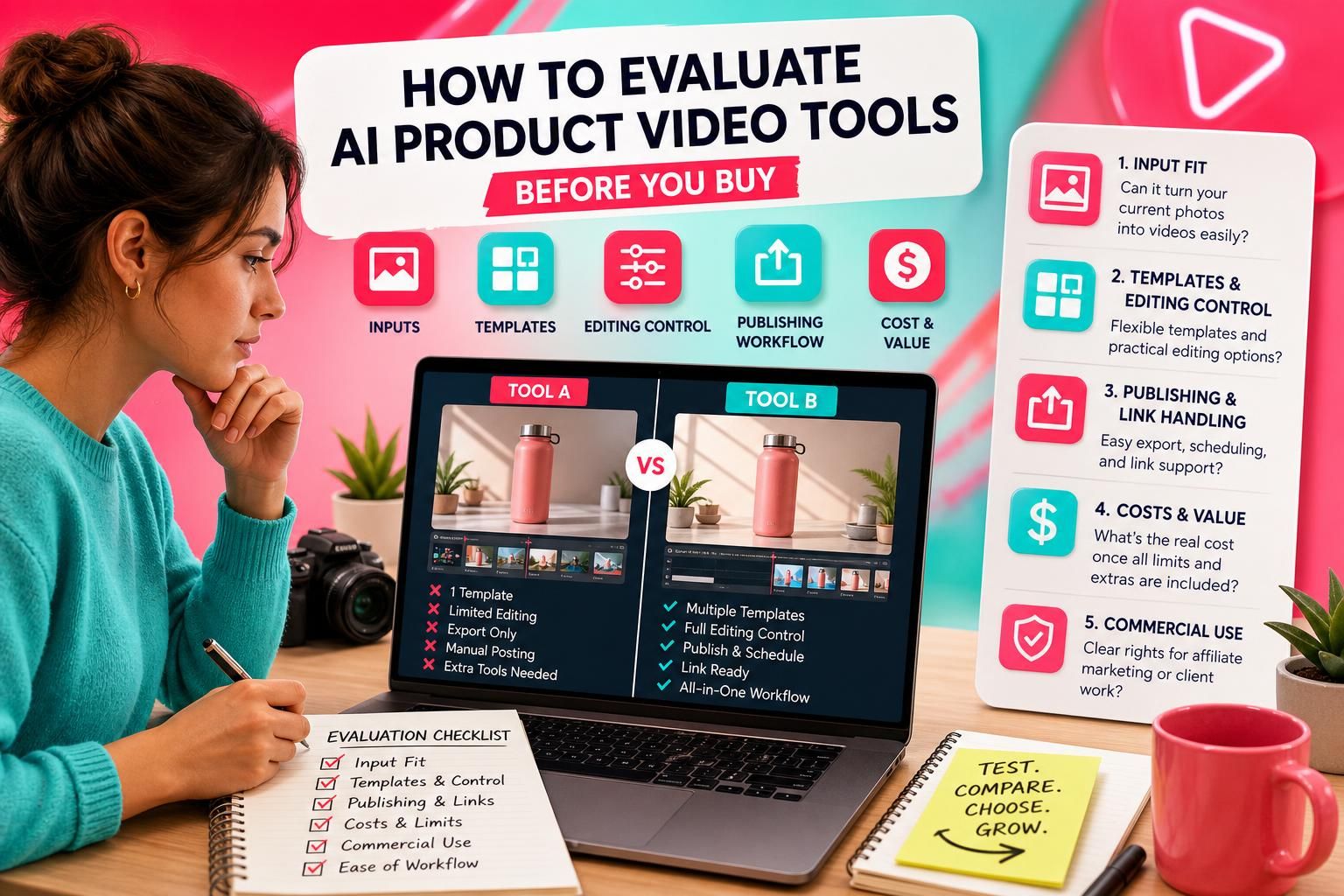
Inputs are the materials you give the tool, such as photos, logos, captions, or product links. Templates are prebuilt scene structures that shape the style and pacing. Editing control is how much you can change the scenes, timing, text, and visuals before exporting. Publishing workflow covers exporting, scheduling, or posting to platforms. Cost structure includes subscriptions, credits, usage limits, add-ons, and any connected-service costs that affect the real budget.
How to Write Better Product Video Hooks and Captions is useful once you understand the mechanics, because a strong caption or opening line can matter as much as the visuals in short-form formats.
Main Process / Strategies
Evaluate the input fit first
Begin by checking what the tool expects as input. If you already have clean product photos, you need a tool that can build from those without forcing a camera shoot or a long prompt process. If you are working with service businesses, you may need the tool to respect existing images rather than turning everything into a synthetic scene. A good test is simple: ask whether your current assets are enough to produce a usable first draft in minutes, not hours.

Check template structure and editing control
Templates are helpful when they reduce decision fatigue, but they should not trap you inside one visual style. Look for practical controls: scene order, duration, image swapping, text editing, aspect ratio options, and the ability to reuse a setup across multiple products. If the tool only offers one style or hides too much behind automation, you may get speed at the expense of fit. That tradeoff can be fine for experimentation, but not if you need repeatable output.
Compare publishing and link handling
If your videos are meant to support sales, the publishing workflow matters as much as the visuals. Some tools only export files, which means you still need to upload them, write captions, and manage links separately. Others support scheduling or multi-platform posting. For affiliate use, check whether the link can be carried through in a way that suits your process. If you sell client work, check whether the commercial use path is clearly separated from personal use. Do not assume a paid plan automatically includes every use case.
Review costs like a business, not a shopper
Look past the headline price and map the real budget. That includes subscription fees, credit usage, export caps, account limits, commercial licensing, and any extra tools you still need for captions, scheduling, or design. For example, if Tool A is cheap but forces you to buy separate scheduler software and caption tools, it may be more expensive in practice than Tool B, which looks pricier up front but replaces more of the workflow. The right comparison is total workflow cost, not sticker price.
Worked example: comparing two tools with the same product photo
Example: imagine you have one clean product photo and want to publish a short video to test demand on TikTok and Pinterest. Tool A gives you a prompt box, one template, and an export file. You can generate something quickly, but you still need to write the caption, add the link somewhere else, and repost manually to each platform. Tool B gives you a structured template library, image-based scene control, and a publishing flow that keeps the campaign organized. Tool B may take slightly longer to learn, but it reduces the number of separate steps you have to remember every time you make a new video.
That example is not about better AI. It is about workflow fit. If your goal is to test multiple products each week, the second tool may be more useful even if the first tool looks simpler on paper. If your goal is a single polished ad, the first tool may be enough. The comparison only works when the use case is clear.
How to Launch a Small Faceless Content Workflow on a Budget shows how to think about tool choice as part of a wider process rather than a single purchase.
FAQs, Mistakes & Expert Insights
Common mistakes people make when comparing tools
One common mistake is overvaluing flashy visuals and undervaluing consistency. A dramatic demo may impress you once, but if the tool makes repeat work awkward, it can slow your workflow immediately. Another mistake is assuming every platform fit is automatic. A square export is not the same as a platform-aware publishing process. A third mistake is ignoring licensing and commercial-use limits until after the tool is already part of your business plan.
Another misconception is that more automation always means better results. In practice, highly automated tools can reduce control over scene timing, image placement, and message clarity. That can be fine for experimentation, but not if you need to keep a consistent brand or product presentation. The best balance is usually a tool that automates the heavy lifting while still letting you make practical changes before export.
FAQ 1: What should I check first in an AI product video tool?
Start with your input type and output goal. If you already have product photos, check whether the tool can use them directly. Then check whether the resulting video can be edited enough to suit your channel, whether you can publish or export it easily, and whether the total cost stays sensible once usage limits are included.
FAQ 2: Is a template library more important than AI generation quality?
Not by itself. Template structure matters because it affects consistency, pacing, and speed, but the generation quality still matters if the visuals look awkward or the motion does not suit the product. For many buyers, the best result comes from a tool that combines both: dependable AI output and enough structure to keep the workflow efficient.
FAQ 3: Do I need publishing tools inside the platform?
Not always, but they can be valuable if you post often. If you only need occasional exports, a separate scheduler may be fine. If you plan to test multiple products or client campaigns, built-in publishing or scheduling can reduce friction and make the process easier to repeat.
FAQ 4: What hidden costs matter most?
Usage caps, export limits, extra credits, separate scheduler fees, commercial licensing terms, and any tools you still need for captions or link management. A tool can look affordable until you realize that the real workflow requires several paid pieces. Always compare the full setup, not just the base plan.
FAQ 5: How do I know if a tool fits affiliate marketing or client work?
Ask whether it supports your specific deliverable. Affiliate work usually needs fast product-to-video creation, link handling, and repeatable publishing. Client work usually needs stronger brand control, clear commercial usage rights, and a workflow you can explain to paying customers. If the tool is designed for both, check that the plan or licence clearly covers both uses before you rely on it.
What should I check first in an AI product video tool?
Start with your input type and output goal. If you already have product photos, check whether the tool can use them directly. Then check whether the resulting video can be edited enough to suit your channel, whether you can publish or export it easily, and whether the total cost stays sensible once usage limits are included.
Is a template library more important than AI generation quality?
Not by itself. Template structure matters because it affects consistency, pacing, and speed, but the generation quality still matters if the visuals look awkward or the motion does not suit the product. For many buyers, the best result comes from a tool that combines both: dependable AI output and enough structure to keep the workflow efficient.
Do I need publishing tools inside the platform?
Not always, but they can be valuable if you post often. If you only need occasional exports, a separate scheduler may be fine. If you plan to test multiple products or client campaigns, built-in publishing or scheduling can reduce friction and make the process easier to repeat.
What hidden costs matter most?
Usage caps, export limits, extra credits, separate scheduler fees, commercial licensing terms, and any tools you still need for captions or link management. A tool can look affordable until you realize that the real workflow requires several paid pieces. Always compare the full setup, not just the base plan.
How do I know if a tool fits affiliate marketing or client work?
Ask whether it supports your specific deliverable. Affiliate work usually needs fast product-to-video creation, link handling, and repeatable publishing. Client work usually needs stronger brand control, clear commercial usage rights, and a workflow you can explain to paying customers. If the tool is designed for both, check that the plan or licence clearly covers both uses before you rely on it.
Summary & Next Steps
Choose the tool that matches the work you actually do
The best AI product video tool is the one that fits your inputs, your output needs, and your budget once all the practical pieces are counted. If you compare tools on workflow, editing control, publishing, and total cost, you will make a better choice than if you compare them on hype alone.
What to do next
Write down your real use case in one sentence: affiliate testing, store promotion, or client service work. Then compare only the tools that support that use case without forcing extra steps. If you want to understand one specific faceless product-video system in context, visit the pillar page on ShopEmpire – Faceless AI Product Videos From Real Photos. If your next step is building a full process around product selection, workflows, and hooks, the supporting guides on trending product research, video hooks and captions, and budget content workflows will help you connect the pieces.
If you are still deciding, do one small side-by-side test before committing. A single product photo, one clear goal, and one repeatable comparison will teach you more than any sales page.
Explore ShopEmpire to check the current options against your requirements.

[…] a broader system, these related guides may help: how faceless affiliate video marketing works, how to evaluate AI product video tools before you buy, how to find trending products worth promoting, how to write better product video hooks and […]
[…] affiliate marketing but need a cleaner content system. For a broader tool-evaluation lens, see how to evaluate AI product video tools before you buy and how to find trending products worth […]
[…] Read the ShopEmpire review for the specific vendor-described workflow and buying limitations, and evaluate AI product video tools against the inputs and output you actually need. This guide does not report hands-on testing of […]