

Commission disclosure: This article contains a promotional link to BrowserAgent Premium. If you buy through it, we may earn a commission at no extra cost to you.
If you’re comparing AI browser tools, the real question is not “Which one sounds most advanced?” It’s “Which one can complete my actual workflow with the least cleanup, confusion, and hidden cost?” This guide is for marketers, solo operators, freelancers, and small teams who need a practical way to judge browser automation tools before buying. The outcome you want is simple: a clearer buying decision based on task fit, reliability, support, and total cost—not on sales copy alone.
For a broader commercial fit check, see the BrowserAgent Premium review, and for category basics, use the browser automation beginner guide.
Direct Answer & Introduction
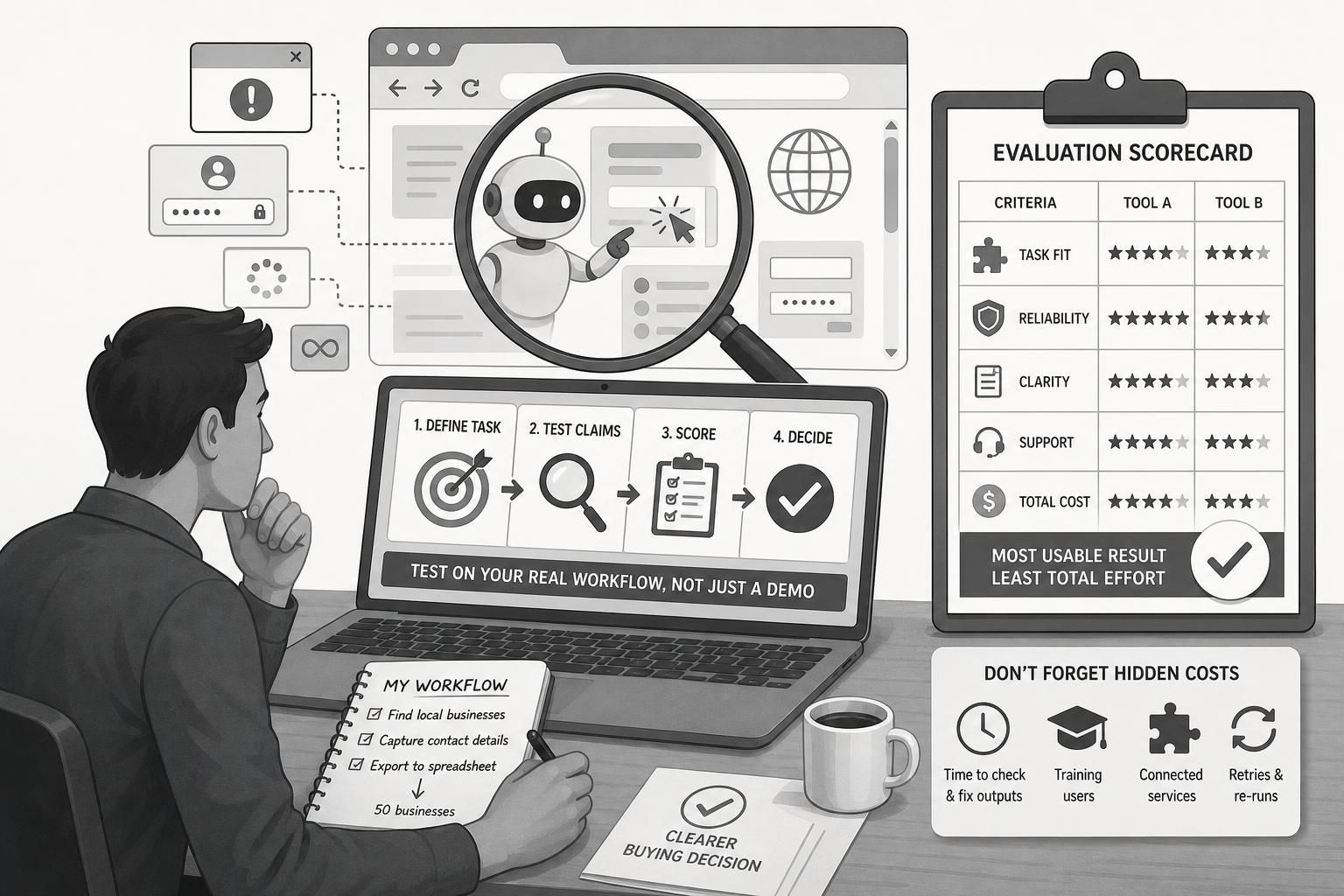
The best way to evaluate an AI browser tool is to test it against one real task you already need done, then score how well it handles that task across five criteria: task fit, reliability, clarity of results, support, and total cost. If a tool saves clicks but creates extra review work, it may not be a good buy. If it finishes the task cleanly, shows what it did, and fits your budget once you include connected services, it deserves a closer look.
What this guide helps you do
This is a practical buying method, not a feature parade. You’ll learn how to read vendor claims critically, compare tools with a simple scorecard, and spot the costs that usually get missed until after purchase.
Fundamentals
What an AI browser tool is
An AI browser tool is software that works inside a browser to search, click, type, scroll, fill forms, gather data, or submit information. In vendor materials for BrowserAgent Premium, the official sales page checked on 2026-09-25 describes browser-based task execution, cloud use, live progress visibility, and ready-made missions. Those are vendor claims, not guarantees, and they should be evaluated against your own workflow.
Features are not outcomes
A feature is what the tool can do. An outcome is what you actually get. “Can open websites and click buttons” is a feature. “Saves two hours every morning” is an outcome, and that outcome depends on whether the task runs cleanly, whether you still need to verify results, and whether the surrounding workflow adds more work than it removes.
Why task fit matters most
A tool can look impressive and still be a poor match if it struggles with the sites you use most. A lead researcher may need repeatable list building on local directories. A content operator may need reliable posting, clean exports, and reviewable logs. The right tool is the one that fits the job you actually do, not the one with the longest feature list.
Main Process / Strategies
Step 1: Define the exact workflow you want to improve
Start with one task, not a category. For example: collect 50 local businesses from a city directory, capture website and contact details, and export them to a spreadsheet. Or: visit prospect websites, extract a few key facts, and draft a first-pass outreach note. A tool that only works in a perfect demo is not enough; you need to know how it behaves in the workflow you repeat.

Example: if you need weekly lead lists, the key question is not whether the tool “does browser automation,” but whether it can complete the same directory search, filtering, and export sequence every time without heavy cleanup.
Step 2: Read sales claims as hypotheses
Sales pages are useful, but they are not proof. Treat them as a list of claims to test: What websites are involved? Does the task require logins? Is another paid service needed? How much human review remains after the run? If a page says a tool can click, scroll, fill forms, or post content, that only tells you what it is designed to do under favorable conditions.
BrowserAgent Premium’s sales materials, checked on 2026-09-25, also claim cloud execution, live browser visibility, and a library of ready-made missions. Those details may help you shortlist the product, but they do not replace a workflow test.
Step 3: Compare reliability on messy websites, not just simple ones
Reliability is where browser tools often separate. A polished tool may work well on a clean page and then slow down when a popup appears, a form changes order, or a page loads dynamic content. Ask how the tool handles logins, multi-step forms, infinite scroll, and websites that do not follow a predictable structure. That is the difference between a demo and something you can trust in production.
Worked example: two hypothetical tools
Imagine Tool A offers guided missions and simple exports, while Tool B gives more control but takes longer to configure. If your work is highly repeatable—say, building the same local lead list every morning—Tool A may be the better fit because speed and consistency matter more than flexibility. If your work changes often or involves niche websites, Tool B may be better because its controls help when pages shift. The winner is the one that reduces friction in your actual process.
Step 4: Count hidden costs before you compare prices
The purchase price is only part of the real cost. Add the time spent checking outputs, retrying failed runs, training users, and managing connected services such as email tools, verification software, storage, or publishing platforms. A lower-priced tool can end up being more expensive if it creates more cleanup.
Practical example: if a browser tool produces a usable lead list only after manual correction, your cost includes that correction time. If you need another tool to verify or deliver the results, that cost belongs in the comparison too. Total effort matters more than the sticker price.
Step 5: Score clarity, support, and handoff quality
Even strong automation can become frustrating if the output is hard to understand. Look for logs, screenshots, clear run histories, and export formats that are easy to hand off to a teammate or client. If you can quickly see what happened, what was found, and where a run stopped, troubleshooting becomes much easier. If the tool gives you a mystery box, expect more manual work later.
If you are comparing browser automation use cases, the lead generation workflow guide, the outreach and content operations guide, and the cost comparison article will help you apply the same thinking to different buying scenarios.
A reusable scorecard
Use a simple 1-to-5 score for each area:
- Task fit: does it complete your actual workflow?
- Reliability: does it handle logins, popups, and page changes?
- Clarity: are logs, outputs, and handoffs easy to read?
- Support: are docs and troubleshooting paths easy to use?
- Total cost: do retries, cleanup, and connected services stay manageable?
When you compare tools this way, you focus on usable output, not marketing language.
FAQs, Mistakes & Expert Insights
Common mistakes buyers make
One common mistake is comparing tools only by headline claims. Another is ignoring the actual websites you use most. A third is assuming automation removes the need for review; in practice, it often shifts the work from clicking to checking.
Another misconception is that “cloud,” “live browser,” or “AI-powered” automatically means better quality. Those terms describe a delivery model or a capability, not a guarantee that the tool will handle messy pages well. The real test is whether it keeps working when the page changes, loads slowly, or contains unexpected steps.
A final mistake is forgetting connected services. If a workflow also needs verification, delivery, storage, or posting tools, include those in the cost comparison from the start.
Nuanced insight: the cheapest option can cost more overall
A lower upfront price can hide time costs later. If a tool needs frequent retries or cleanup, your team pays in hours, frustration, and slower output. The best comparison is not “Which tool is cheapest?” but “Which tool produces the most usable result for the least total effort?”
Nuanced insight: good automation still needs governance
If a tool can collect, submit, or publish data, your team still needs rules for review, permissions, and quality control. That is true whether you use it for research, outreach, or content work. A good buying decision includes a plan for who checks outputs and when.
FAQ: How do I know if an AI browser tool is a fit for my work?
Start with one task you do every week and judge the tool only on that task. If it cannot handle the workflow cleanly, the broader feature set matters less. A good fit should reduce the amount of manual correction needed after each run.
FAQ: What should I look for in reliability?
Look at how the tool handles logins, popups, changing page layouts, and multi-step forms. Reliability is not just whether it works once; it is whether it still works when the site is a little messy or the structure shifts.
FAQ: Are vendor claims worthless?
No. They are useful as a starting point, but they should be treated as claims to verify. A sales page can tell you what a tool is designed to do, but only your own workflow can show whether the output is good enough to use with minimal cleanup.
FAQ: What hidden costs do buyers miss most often?
The most common misses are time spent fixing outputs, time spent training users, and the cost of connected services needed to complete the workflow. If you need extra tools for storage, verification, delivery, or posting, include them in the comparison.
FAQ: What is the simplest way to compare two tools?
Use the same task, the same input data, and the same success criteria for both tools. Score task fit, reliability, clarity, support, and total cost. The better option is the one that gives you the most usable result with the least friction.
How do I know if an AI browser tool is a fit for my work?
Start with one task you do every week and judge the tool only on that task. If it cannot handle the workflow cleanly, the broader feature set matters less. A good fit should reduce the amount of manual correction needed after each run.
What should I look for in reliability?
Look at how the tool handles logins, popups, changing page layouts, and multi-step forms. Reliability is not just whether it works once; it is whether it still works when the site is a little messy or the structure shifts.
Are vendor claims worthless?
No. They are useful as a starting point, but they should be treated as claims to verify. A sales page can tell you what a tool is designed to do, but only your own workflow can show whether the output is good enough to use with minimal cleanup.
What hidden costs do buyers miss most often?
The most common misses are time spent fixing outputs, time spent training users, and the cost of connected services needed to complete the workflow. If you need extra tools for storage, verification, delivery, or posting, include them in the comparison.
What is the simplest way to compare two tools?
Use the same task, the same input data, and the same success criteria for both tools. Score task fit, reliability, clarity, support, and total cost. The better option is the one that gives you the most usable result with the least friction.
Summary & Next Steps
How to decide
Choose the tool that best matches your real workflow, not the one with the loudest promise. If your process is simple and repeatable, prioritize ease and consistency. If your process is unusual or changes often, prioritize flexibility and support. In either case, use the scorecard before you buy.
What to do next
If BrowserAgent Premium is on your shortlist, review the BrowserAgent Premium review for a broader commercial fit check. If you are still learning the category, start with browser automation basics, then move to lead generation workflows, outreach and content operations, and cost comparisons to complete your buying picture.
The sales page for BrowserAgent Premium presents browser-based automation, cloud execution, and ready-made missions. Use those claims as a starting point, then judge them against the workflow you actually need done.
Explore BrowserAgent Premium to check the current options against your requirements.

[…] How to Evaluate an AI Browser Tool Before You Buy […]
[…] on them. You can inspect the BrowserAgent Premium offer page directly, then compare it with our how to evaluate an AI browser tool guide, our browser automation lead generation workflow, and our browser automation cost comparison […]
[…] By the end, you should be able to tell browser automation apart from a macro, a script, and a chat tool. You should also be able to map a simple workflow and understand where human oversight still matters. For a deeper fit check, see BrowserAgent Premium review and the tool evaluation checklist. […]
[…] you are still evaluating, start with the practical comparison questions in how to evaluate an AI browser tool before you buy. If your use case is more operational, the workflows in browser automation for lead generation and […]