

Commission disclosure: This article contains a promotional link to BrowserAgent Premium. If you purchase through it, ProdifyDigital may earn a commission at no extra cost to you.
If lead research is eating your day, browser automation can help by handling the repetitive clicking, searching, copying, and sorting that sit between “I need prospects” and “I have a usable list.” The outcome is faster list-building, not effortless revenue. You still need a clear niche, sensible filters, and a human review pass before any outreach goes out.
This guide is for solo operators, small agencies, and marketers who want a repeatable lead-generation workflow without pretending the work disappears. I’ll show how to structure the search, clean the output, and hand off a list that is actually usable.
For broader context, see the BrowserAgent Premium review, plus the related guides on browser automation basics, how to evaluate an AI browser tool, and automation for outreach and content operations.
Direct Answer & Introduction
What browser automation can do in lead generation
Browser automation can speed up lead generation by visiting search pages, opening directories, collecting visible business details, and moving those details into a usable list. In practical terms, it reduces the repetitive browser work that slows prospecting down. It does not remove the need for judgment, because business data can be incomplete, duplicated, or outdated.
Who this workflow is for
This workflow suits readers who need local-business prospects, niche vendor lists, or research-based contact lists and want a process they can repeat. If your work depends on finding a large number of reasonably fitting prospects quickly, browser automation may save time. If your offer depends on deep account research or highly regulated outreach, you still need tighter review and process controls.
What outcome to expect
A good workflow should leave you with a filtered, deduplicated list that is easier to import into a spreadsheet, CRM, or outreach sequence. Think of automation as the list-building assistant; you remain the editor and final decision-maker.
Fundamentals
Key terms to know
Browser automation means software that performs browser tasks such as searching, scrolling, opening pages, filling forms, and copying data. Lead generation is the process of identifying potential customers who fit a target profile. Verification is the manual or semi-manual check that confirms the lead details are current enough to use.
Why structure matters before tools
The strongest workflows begin with a narrow niche and a clear data standard. If you define the target first—such as “dentists in one city with weak review presence”—the automation can search more consistently and return a list that is easier to clean. Without a defined target, the tool may gather plenty of data but little that is useful.
Quality and compliance principles
Lead generation should respect site terms, privacy expectations, and your own outreach standards. Even when information is visible on the web, visible does not automatically mean ready for bulk use. A practical workflow balances speed with care: collect what is visible, store it responsibly, and verify before outreach.
Main Process / Strategies
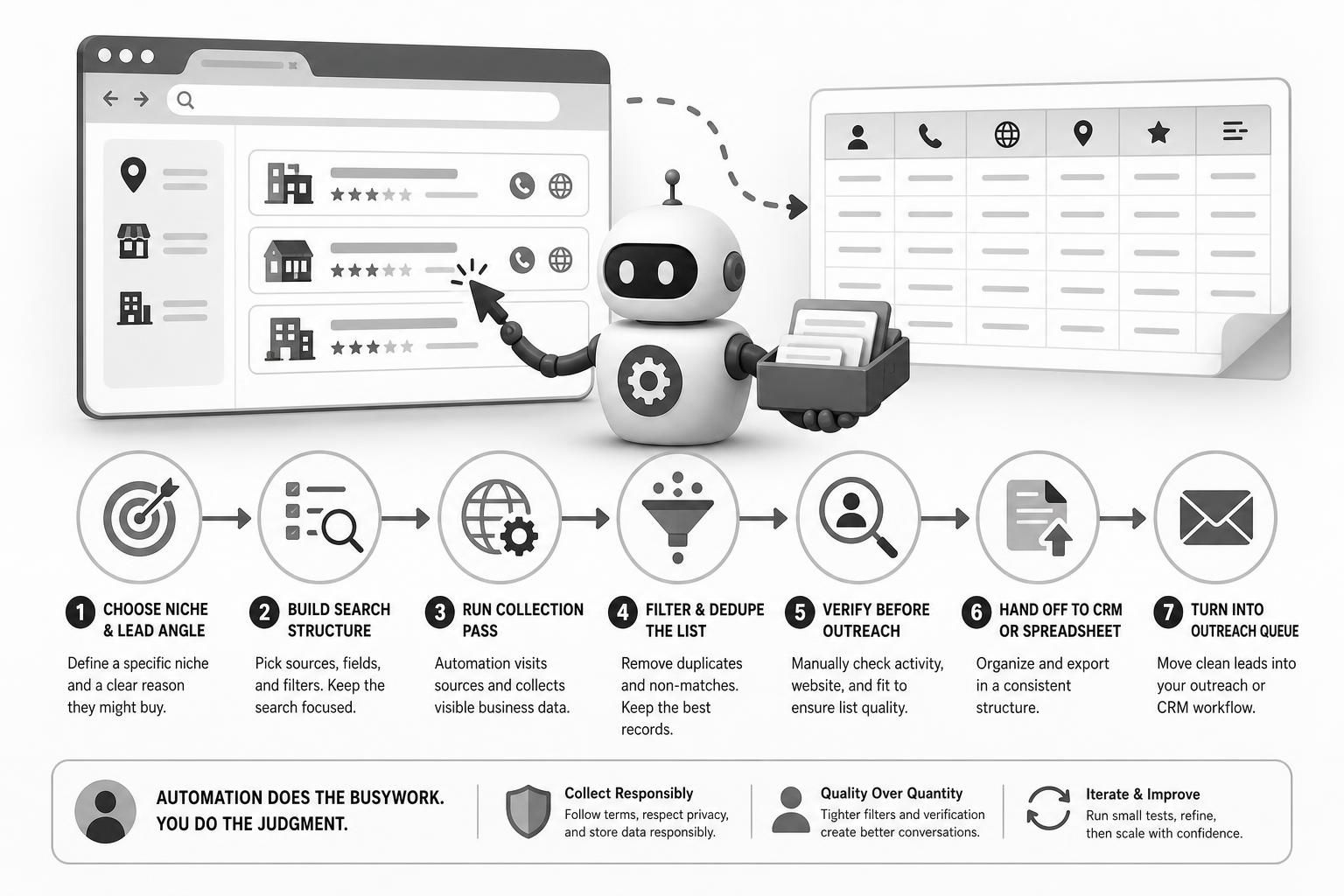
Step 1: Choose a niche and a lead angle
Start with a niche that has a plausible service need. Examples include local service businesses with weak websites, multi-location businesses with inconsistent listings, or B2B firms that show signs of growth. Your lead angle is the reason they may buy: poor review management, missing site content, outdated contact info, or active hiring.

Example: A small agency targets plumbing companies in one metro area that have low review counts and outdated websites. The workflow has a clear filter: location, industry, and a sign of opportunity.
Step 2: Build the search structure
Create a simple search map before running automation. Define your source types, such as Google Maps, directories, review sites, or business listings. Then decide the fields you want: business name, phone, website, city, review count, and one or two qualifying notes.
Useful search structure usually includes:
- One city or region at a time
- One business category per run
- A small set of qualifying signals
- A consistent naming rule for exports
This keeps the workflow focused and makes it easier to compare results across runs.
Step 3: Run the collection pass
Use browser automation to open the source pages, gather visible business details, and export them into a spreadsheet or table. If the tool supports tasks or missions, choose one that matches the source type you plan to use. Keep the first run modest so you can check whether the fields are being captured correctly before scaling up.
Worked example: You ask the tool to pull 50 HVAC companies in one city from a directory and a map listing source. The output includes names, phones, websites, and review counts. That is enough for a first pass, but not enough to send outreach yet.
Step 4: Filter and dedupe the list
Once the raw data is collected, clean it. Remove duplicate businesses, obvious non-matches, and records with missing key fields. If the same company appears in multiple sources, keep the most complete version and note where the information came from. Dedupe rules matter because duplicate outreach can damage deliverability and brand trust.
A practical dedupe process:
- Sort by business name and location.
- Merge identical or near-identical records.
- Keep the best contact field set.
- Flag missing websites or phone numbers separately.
Step 5: Verify before outreach
Do a manual review of a sample or the full list, depending on volume. Check whether the website still resolves, whether the business appears active, and whether the fit still makes sense. Automation can gather data; it cannot reliably judge context the way a person can.
Example: A business may still appear in a directory even though it has closed or changed names. A quick manual check prevents wasted outreach and protects list quality.
Step 6: Hand off to CRM or spreadsheet
After verification, organize the data for handoff. If you use a CRM, map the fields so each record has the same basic structure. If you prefer a spreadsheet, use separate columns for source, niche, contact details, notes, and status. This makes later outreach, follow-up, and reporting much easier.
A tidy export often includes:
- Business name
- Website
- Phone
- City
- Qualification note
- Source used
- Review or status flag
Step 7: Turn the list into an outreach queue
Once the list is clean, hand it to your outreach process. That may mean assigning records to a salesperson, importing them into a cold email tool, or adding them to a CRM sequence. The point is to separate list-building from outreach execution so each process stays manageable.
FAQs, Mistakes & Expert Insights
Common mistakes to avoid
The biggest mistake is assuming automation replaces strategy. If your niche is too broad, the output will be noisy. If your filters are weak, you will collect data that looks impressive but does not convert into conversations. Another common error is skipping dedupe and then wondering why the list feels inflated but underperforms.
It is also easy to overtrust the browser output. Public listings can be incomplete, outdated, or duplicated across sources. That is why quality control belongs in the workflow, not at the end as an afterthought.
Nuanced insights that improve results
Smaller, tighter runs usually outperform broad scraping when the goal is usable leads. A highly specific niche with a modest list size is often more valuable than a giant list full of poor fits. In practice, the best workflow is iterative: run a sample, inspect the output, refine the filters, then scale.
Another useful insight is that your lead angle should influence your list fields. If you sell reputation management, review count matters. If you sell website redesigns, website presence and mobile usability matter more. In other words, collect the data you will actually use to qualify the lead.
One more practical point: if your source mix includes directories and map listings, expect overlap. Overlap is not a failure; it is a signal to tighten your dedupe rules and keep the most complete record.
Browser automation also works best when you treat the first run as a test batch. The goal is to catch missing fields, broken filters, and source-specific quirks before you scale to a larger city or a second niche.
How is browser automation different from ordinary lead scraping tools?
Browser automation works through a live browser, which is useful when a lead workflow involves search pages, dynamic directories, or multiple steps that are awkward in static export tools. It still needs a clear process and manual review, because browser-based output can contain duplicates, gaps, or outdated details.
What is the safest way to start a lead-generation workflow?
Begin with one niche, one city, and a small batch of records. That lets you test your filters, check the data fields, and confirm that the list is actually useful before you expand the process.
Which data fields should I prioritize first?
For many local lead workflows, business name, website, phone, city, and one qualification note are the most practical starting fields. If your offer depends on another signal, such as review count or hiring status, include that too.
Do I still need to verify the list if automation already collected it?
Yes. Automation can gather data faster, but it cannot reliably judge whether a business is closed, merged, or no longer a fit. Verification protects list quality and reduces wasted outreach.
Can I send the same cleaned list straight into outreach software?
Usually yes, but only after you map the fields correctly and remove duplicates. A tidy spreadsheet or CRM import makes later outreach easier and helps you avoid sending the same message twice.
Summary & Next Steps
What to do after the first list
The best next step is to run one narrow test list, review the results, and tighten the workflow before you scale. Once the process is dependable, you can reuse it for new cities, niches, or service offers. That is where browser automation becomes genuinely useful: not because it removes judgment, but because it reduces the busywork around good judgment.
Practical next action
If you want to compare lead-building workflows with broader automation use cases, the surrounding guides on browser automation basics, tool evaluation, and outreach operations will help you connect the pieces. If you are evaluating BrowserAgent Premium specifically, the BrowserAgent Premium review covers fit and limitations in more detail.
BrowserAgent Premium may be useful for readers who want browser-based task automation in a lead workflow, but the value still depends on your niche, your data rules, and how carefully you verify the output.

[…] you are comparing browser automation use cases, the lead generation workflow guide, the outreach and content operations guide, and the cost comparison article will help you apply the […]
[…] Browser Automation for Lead Generation: A Step-by-Step Workflow […]
[…] Premium offer page directly, then compare it with our how to evaluate an AI browser tool guide, our browser automation lead generation workflow, and our browser automation cost comparison […]
[…] AI browser tool before you buy and the BrowserAgent Premium review. For adjacent use cases, explore lead generation workflows, outreach and content operations, and cost […]
[…] evaluate an AI browser tool before you buy. If your use case is more operational, the workflows in browser automation for lead generation and browser automation for outreach and content operations can help you estimate usage more […]