

Commission disclosure: This article may include a paid promotional link to ProductsPilot. The guidance below stands on its own and is meant to help you build a simple, buyer-ready digital product even if you use a different tool or no tool at all.
If you want to create a sellable digital product quickly, the hardest part is usually not the software. It is turning a simple idea into a file set that a buyer can understand, download, and use without friction. This guide is for beginners who want a realistic one-afternoon workflow, and for existing sellers who want a cleaner process for small products such as printables, planners, templates, worksheets, or guides.
By the end, you should know what belongs in a basic product bundle, how to move from idea to export without overbuilding, and what to check before you list. If you are still deciding what to make, start with the digital product niche selection guide. If you already have the product idea but need help turning it into a buyer-facing page, the listing-writing guide is the next useful step.
Direct Answer & Introduction
Yes — a sellable first product can be built in one afternoon
A sellable digital product does not have to be large, fancy, or deeply technical. For a first build, it only needs to solve a narrow problem, be easy to understand, and arrive in the file format the buyer expects. If you keep the scope tight, one afternoon is enough to create a workable first version.
This is especially practical for readers who want a low-complexity start: a printable checklist, a one-page planner, a simple worksheet, a short template, or a compact guide. Those products are often easier to finish because the content and the delivery format are straightforward.
What outcome you should aim for
At the end of the session, your goal is not perfection. It is a finished file set that is coherent, readable, and ready for review. In practical terms, that usually means a core file, any supporting pages you genuinely need, a final export, and a simple preview image set. If you can hand the bundle to a stranger and they can quickly see what it is for, you are on the right track.
Where a tool may help
If you want help speeding up parts of the workflow, ProductsPilot is presented by its vendor as a tool for niche discovery, product assembly, and listing prep. That can be useful for some beginners, but the core process below still matters because the product itself has to make sense to a buyer.
Fundamentals
What makes a digital product sellable
Sellability starts with usefulness. A buyer needs to see who the product is for, what problem it solves, and how they will use it. The better you define that early, the easier every later decision becomes: page count, format, tone, preview images, and even file naming.
Three principles matter most:
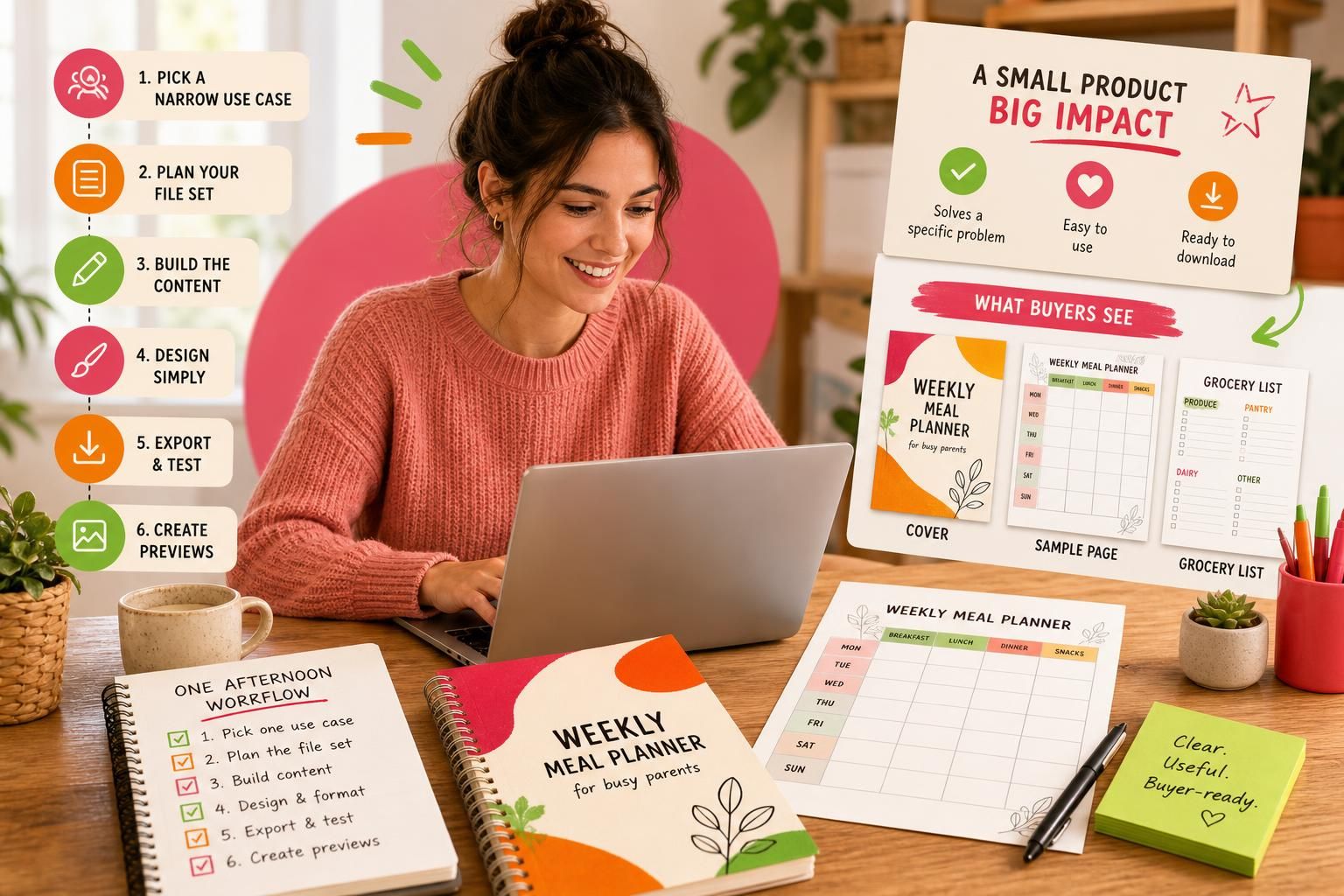
- Specificity: A product for “busy parents” is more usable when it becomes “weekly meal planner for busy parents.”
- Clarity: The buyer should not have to guess what they are getting or how they use it.
- Low friction: The file should open, read, and deliver the expected result without extra explanation.
A product can be simple and still feel valuable. In fact, simplicity often helps because it reduces confusion.
The basic components of a product bundle
Most first products need only a few essentials:
- Core file: the main deliverable, such as a PDF, template, or worksheet.
- Support pages: instructions, a cover page, usage notes, or a quick-start page.
- Exports: the final file versions buyers expect for that type of product.
- Preview assets: a small set of images that show what the buyer receives.
The exact contents should match the use case. A printable checklist does not need the same structure as a digital planner. The principle is the same, though: include what helps the buyer succeed, and skip extras that only make the bundle heavier.
Why scope matters so much
Many first-time creators lose time by trying to build a “complete” product instead of a usable one. That usually leads to more pages, more decisions, and more chances for formatting problems. A narrow scope makes it easier to finish, test, and improve later.
Think of the first version as a clean starting point. You are proving that the product works, not trying to solve every possible customer need in one file.
Main Process / Strategies
1) Start with one buyer situation
Begin with a real use case, not a vague topic. “Productivity” is too broad to build quickly. “Weekly study planner for college students” or “client intake checklist for freelance designers” gives you something concrete to design around.

Example: If you choose “home-school reading log,” you immediately know the fields, the tone, and the likely page length. If you choose “education bundle,” you may spend half your time deciding what should even be inside it.
2) Decide the file set before opening the design tool
Before you design anything, write down exactly what belongs in the bundle. This prevents the common mistake of adding pages after the fact because they “might be useful.” Ask three questions:
- What should the buyer do with this?
- Which format makes that easiest?
- What would reduce confusion at download time?
A basic printable may only need one polished PDF and one short instruction page. A planner might need a cover and interior pages. A template might need one clean master file plus a short usage note. Decide first, then build.
3) Build the content before the styling
The substance comes first. A good color palette cannot rescue unclear content. Draft the actual prompts, fields, steps, or sections before you spend time making them look polished.
A practical order is:
- Write or outline the content.
- Lay it out in a simple structure.
- Apply typography, spacing, and color.
- Add a cover or preview image.
- Export and test the result.
This sequence helps you catch structural mistakes early. If the wording, page order, or logic needs changing, it is easier to fix before the design is finalized.
4) Use a worked example to keep the build focused
Worked example: Suppose you want to create a “meal planning pack for busy parents.” A strong one-afternoon version might include a weekly meal planner, a grocery list page, and a notes page. That is enough to be useful without becoming a full course on meal planning.
Design it around easy reading and quick use. Use a readable header, enough white space for handwriting or digital entry, and a simple palette that does not distract from the form. Your preview images should show the actual pages and the benefit clearly. In most beginner cases, a smaller product that solves one job well is more convincing than a larger bundle that feels cluttered.
5) Choose export formats that match the use case
Your export decisions should reflect how the product will be used. Printables usually need a high-resolution PDF. Editable templates may need a separate editable format or platform-specific access. If the market expects both US Letter and A4, or another size variation, include it only when it genuinely improves usability.
Keep the working file separate from the final export. Save the native source file, the final deliverable, the preview images, and a short note explaining version, date, and intended use. That habit saves time when you need to revise the product later.
6) Test it like a customer would
Testing is where many simple products become reliable. Open the file on a second device if you can. Check page order, text readability, margins, link behavior if the file is interactive, and whether anything gets clipped in print or on screen. Then read the instructions as though you have never seen the product before.
Example: If a worksheet has a fillable area, ask whether the fields are large enough to use comfortably. If a planner includes tabs or navigation, make sure they go where they should. If the instructions mention paper size, confirm that the size actually matches the export.
7) Prepare the listing materials alongside the product
You do not need a huge gallery for an early product, but you do need enough preview material for a stranger to understand what they are buying. Show the cover, a sample interior page, and one image that highlights the main benefit or use case. Clear previews often matter more than decoration because they help buyers make sense of the product quickly.
If you want a practical next step after the file is finished, see the digital product listing guide. If you are preparing for launch and want a simple upload-and-check routine, the launch checklist guide is the natural follow-up.
A simple one-afternoon timeline
For a small product, a realistic workflow might look like this:
- 30 minutes: choose the use case and define the file set.
- 45 minutes: draft the content or structure.
- 45 minutes: format and style the pages.
- 30 minutes: export, test, and fix obvious issues.
- 30 minutes: create preview images and save the final assets.
This is not a promise that every product will fit neatly into that window. It is a useful benchmark for narrow, beginner-friendly products.
FAQs, Mistakes & Expert Insights
Common mistakes that slow down a first product
The biggest mistake is making the product too broad. Broad ideas create vague layouts and unclear value. A second mistake is polishing visuals before the content is usable. Attractive design helps, but it cannot compensate for a confusing file. A third mistake is exporting without testing, which often leads to cut-off text, broken links, or incorrect page sizes.
Another common problem is adding extra file types or extra pages that do not help the buyer. More material can make the bundle feel bigger while making it harder to understand. For a first product, clarity usually beats volume.
Misconceptions about “quick” creation
Quick does not mean careless. It means focused. A one-afternoon product still needs a clear audience, a sensible format, and a reliable file. It also does not mean every product category can be handled the same way. A simple checklist is very different from an interactive planner or a larger template pack.
One useful nuance is that a small product can be more useful than a larger one if it solves one problem well. Beginners often assume they need a giant bundle to look serious. In practice, a compact, well-labeled file can be easier to trust and easier to use.
What quality looks like in practical terms
Quality includes more than appearance. It also includes readable text, sensible spacing, a clean page flow, and instructions that make sense immediately. If a buyer can open the product, understand it quickly, and use it without guessing, that is real quality.
For beginners, the safest quality strategy is to reduce friction everywhere: fewer file types, fewer confusing labels, and fewer unnecessary flourishes. That usually creates a better first experience than trying to impress with complexity.
What to save before you finish
Keep the source file, the final export, the preview images, and a short product note that records the product name, intended use, page count, and export settings. If you later revise the product, that documentation will save time and reduce confusion.
It also helps to save your own workflow checklist. If you want to build more than one product, repeatable steps matter more than inspiration. The easier your process is to repeat, the easier it becomes to produce a second and third product without starting over mentally.
Five reader questions
What is the easiest first product to make?
A narrow printable, checklist, or planner page is usually easier than a complex interactive file because it has fewer technical steps and fewer ways to break.
Do I need design experience?
No. You do need readable layout choices, consistent spacing, and a clear idea of who the file is for. Structure matters more than advanced visual effects.
Should I make one big bundle or several smaller files?
For a first afternoon project, smaller is usually better. A focused product is easier to finish, easier to test, and easier to improve later.
What if my idea feels too simple?
Simple is not a weakness if it solves a real use case. Buyers often prefer a clear, immediate solution over a bundle that feels overloaded.
How do I know if the file is ready to list?
It should open correctly, read clearly, match the buyer’s use case, and include the basic supporting assets someone needs to understand it at a glance.
What is the easiest first product to make?
A narrow printable, checklist, or planner page is usually easier than a complex interactive file because it has fewer technical steps and fewer ways to break.
Do I need design experience?
No. You do need readable layout choices, consistent spacing, and a clear idea of who the file is for. Structure matters more than advanced visual effects.
Should I make one big bundle or several smaller files?
For a first afternoon project, smaller is usually better. A focused product is easier to finish, easier to test, and easier to improve later.
What if my idea feels too simple?
Simple is not a weakness if it solves a real use case. Buyers often prefer a clear, immediate solution over a bundle that feels overloaded.
How do I know if the file is ready to list?
It should open correctly, read clearly, match the buyer’s use case, and include the basic supporting assets someone needs to understand it at a glance.
Summary & Next Steps
Your simplest path forward
If you want to create a sellable digital product in one afternoon, keep the process narrow. Choose one use case, define the file set, build the content, style it simply, export carefully, and test it like a customer. That sequence is enough to produce a real first product without turning the project into a long build.
What to do after the first file is finished
If you are still choosing what to make, move to niche selection so you are not building blindly. If the file is finished, use listing copy that helps buyers decide to improve how you present it. If you are about to publish, the first-time seller launch checklist can help you avoid missing export and upload basics.
If you want a tool-assisted shortcut for parts of the process, you can review the ProductsPilot option as one possible route for niche discovery, product assembly, and listing prep. Use it only if it fits your product type and your workflow.
The main takeaway is straightforward: your first digital product does not need to be big. It needs to be clear, useful, and finished.
Continue with a related guide
For commercial investigation, read ProductsPilot Review: Is the Front-End Offer Worth It for Beginner Digital Product Sellers?.

[…] structure buyers need. For broader context, see choosing a profitable digital product niche, creating a sellable digital product, validating product ideas before you build, and the front-end offer […]
[…] This checklist is for beginners who want a practical launch path for one digital product or a small first catalog. The goal is simple: help a buyer understand the offer quickly, download it smoothly, and know what to do next. For broader niche selection and product-building context, see how to validate digital product ideas before you spend too long building them and how to create a sellable digital product in one afternoon. […]