

Quick answer
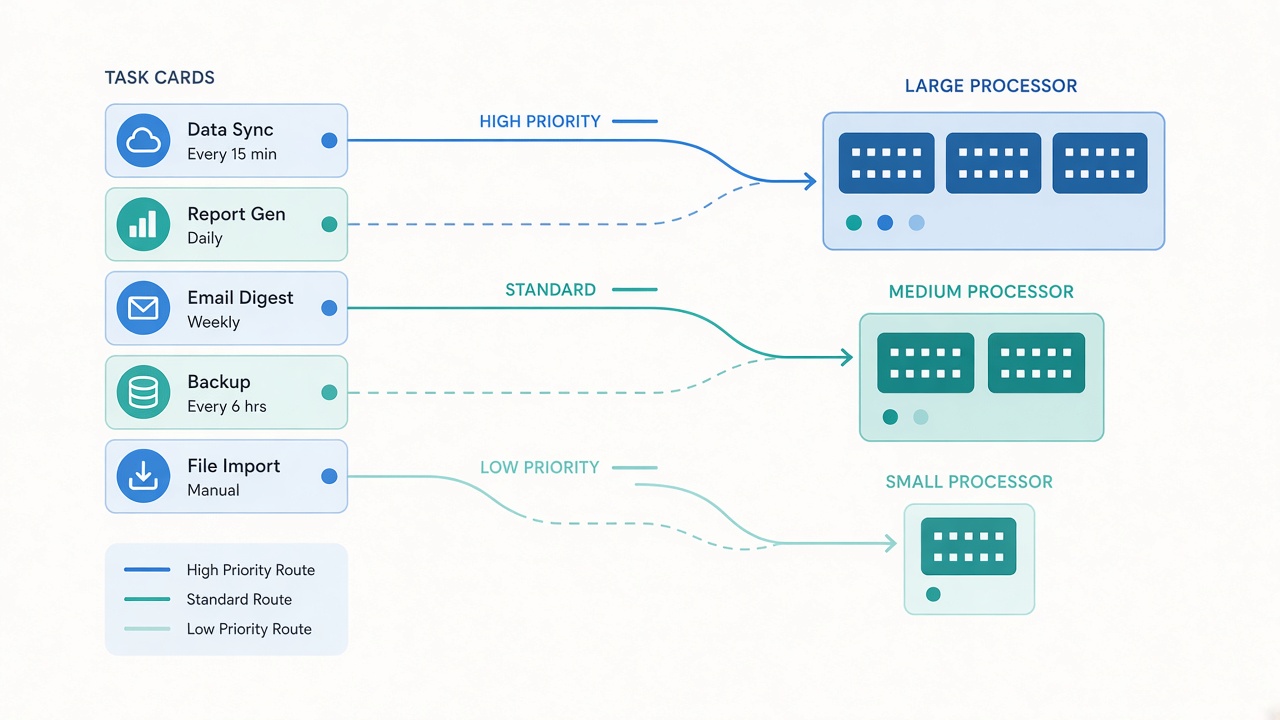
AI model routing for small business means sending each task to the cheapest model that does it well enough. Start new workflows on a balanced default, move repetitive and easy-to-check tasks to a smaller, cheaper model, and reserve the most capable model for complex, high-stakes work where errors are expensive.
Key takeaways
- Routing means sending each task to the cheapest model that does it well
- Start new workflows on a balanced default, such as Sonnet 5.5
- Move repetitive, easy-to-check tasks down to a smaller model
- Move up only when errors are costly and quality is consistently short
This guide answers one question that comes out of our article Claude Haiku 5.5 vs Sonnet 5.5 vs Opus 5.5: Which Should You Use?: once you know what each model is good at, how do you actually decide which task goes where?
📘 Main article: This guide supports our full article, Claude Haiku 5.5 vs Sonnet 5.5 vs Opus 5.5: Which Should You Use?. Read it for the complete picture.
What is AI model routing?
Routing is a simple rule set that decides which AI model handles which job. Instead of using one model for everything, you match the model to the task.
Using Anthropic's Claude 5.5 family as the example:
- Haiku 5.5: fast and cheap, built for high-volume work such as classification and summaries
- Sonnet 5.5: the balanced default for writing, research and coding
- Opus 5.5: the flagship for complex, multi-step and high-stakes tasks
How do you build a routing map?
- List your recurring AI tasks. Include anything you run weekly.
- Rate each task on three things: volume, difficulty and the cost of a mistake.
- Assign a starting model using the rules below.
- Test each assignment on real examples.
- Adjust up or down based on results.
Which rules should decide the model?
| Task profile | Starting model | Why |
|---|---|---|
| High volume, simple, easy to check | Small model (e.g. Haiku 5.5) | Lowest cost per task |
| Everyday writing, research or coding | Balanced model (e.g. Sonnet 5.5) | Good quality at a sensible price |
| Complex, multi-step, costly if wrong | Flagship (e.g. Opus 5.5) | Strongest reasoning |
| New or unclear task | Balanced model | Safe default while you learn |
What does a marketing routing map look like?
Here is an example based on the routing table in our main article.
| Task | Model |
|---|---|
| Tag inbound leads by intent | Haiku 5.5 |
| Summarise short sales calls | Haiku 5.5 |
| Summarise nuanced calls | Sonnet 5.5 |
| Draft blog posts and emails | Sonnet 5.5 |
| Review landing page code | Sonnet 5.5 |
| Plan a multi-step campaign agent | Opus 5.5 |
Map your first workflow today. List five tasks you run every week and assign each one a starting model.
When should you move a task to a different model?
Move down when:
- The task has become repetitive and well defined
- Outputs are easy to spot-check
- Quality has been stable for several weeks
Move up when:
- The current model regularly needs fixes
- Mistakes are costly, such as customer-facing or financial content
- The task involves long chains of reasoning
💡 Tip: Review your routing map monthly. Tasks often become simpler and cheaper to run once your prompts are stable.
How do you keep routing under control?
- Keep the routing map in one shared document
- Note the effort level used for each task
- Record why a task was moved
- Re-check costs whenever prices change
Need help choosing the models themselves? Our Claude 5.5 comparison covers what each one is best at. Find more AI workflow guides on Prodify Digital.
Frequently asked questions
Do I need code to route between models?
Not always. Many automation tools let you pick a model per step, so you can route without writing code.
Is it worth using three models?
For workflows with real volume, yes. Moving simple steps to a cheaper model can save money with no loss in quality.
What is the safest default model?
A balanced model such as Sonnet 5.5 is a sensible starting point for new or unclear tasks.
How often should I review routing?
Monthly, and whenever a new model or price change arrives.
Can routing work with non-Claude models?
Yes. The same small, balanced and flagship logic applies to any model family.
The bottom line
Routing turns model choice into a simple, repeatable rule. Start balanced, move simple work down, move hard work up, and review regularly.
Related posts
- Claude Haiku 5.5 vs Sonnet 5.5 vs Opus 5.5: Which Should You Use?
- Claude Haiku 5.5: Pricing and a Small-Business Pilot
- How to Score AI Use Cases by Value, Risk and Reversibility

[…] even needs a frontier model? Many jobs run perfectly well on smaller, cheaper models. Our guide to AI model routing for small business shows how to match each task to the right […]
[…] and keep rumours in a “watch” column. If you are juggling several models already, our guide to AI Model Routing for Small Business: Match Each Task to the Right Model helps you match each task to the right […]
[…] week, write down what “good” looks like, and run it on two models side by side. Our guide to AI model routing for small business shows how to match each task to the right […]
[…] and keep rumours in a “watch” column. If you are juggling several models already, our guide to AI Model Routing for Small Business: Match Each Task to the Right Model helps you match each task to the right […]
[…] here. Anything touching money or legal commitments should keep a person in charge. Our guide to AI model routing helps you match each task to a suitable […]