

[geo_answer label=”Quick Answer”]GroovePages Builder offers powerful Custom CSS Attributes functionality that allows marketers and website builders to create highly customized, professional-looking pages without needing extensive coding knowledge. This feature enables users to apply custom styling, animations, and design modifications directly to any element within the GroovePages editor, making it an essential tool for affiliate marketing professionals focused on list building and conversion optimization.[/geo_answer]
Mastering Custom CSS Attributes in GroovePages Builder
If you're serious about list building and affiliate marketing, understanding how to leverage custom CSS attributes in GroovePages Builder can dramatically transform your landing pages, sales funnels, and opt-in forms. This comprehensive tutorial walks you through everything you need to know about applying custom CSS to your GroovePages elements, helping you create visually stunning pages that convert visitors into subscribers and customers.
Whether you're a complete beginner to web design or an experienced marketer looking to fine-tune your funnel aesthetics, this guide is designed to help you unlock the full potential of GroovePages' custom styling capabilities. According to a Stanford Web Credibility Research study, 75% of users judge a company's credibility based on their website design, making custom CSS skills invaluable for anyone building landing pages for affiliate marketing or list building purposes.
What Are Custom CSS Attributes in GroovePages?
Custom CSS attributes in GroovePages allow you to apply specific styling rules directly to individual elements on your page. Unlike global styles that affect your entire website, custom CSS attributes give you granular control over exactly how each button, text block, image, container, or form appears and behaves. This level of customization is crucial for affiliate marketers who need their pages to stand out in competitive niches.
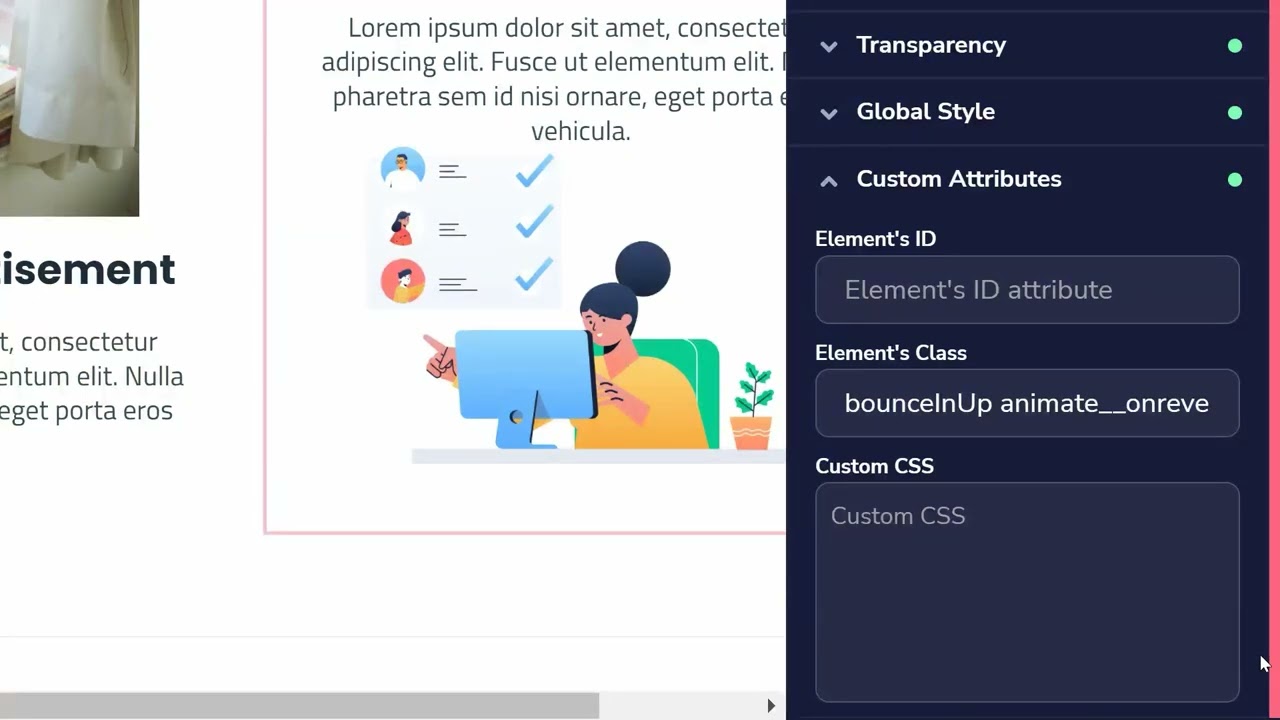
The GroovePages Builder interface makes it remarkably straightforward to add these custom styles without touching a single line of code in an external stylesheet. You can access the custom CSS attributes panel by selecting any element on your page and navigating to the advanced styling options. From there, you can input CSS properties that will apply exclusively to that selected element.
Why Custom CSS Matters for Affiliate Marketing Success
In the world of affiliate marketing and list building, your landing pages need to accomplish several critical objectives simultaneously. They must capture attention within seconds, build trust quickly, and guide visitors toward taking a specific action—whether that's joining your email list, clicking an affiliate link, or making a purchase. Custom CSS attributes help you achieve all of these goals by giving you complete creative control over your page design.
Research from HubSpot indicates that landing pages with personalized, unique designs can increase conversion rates by up to 202% compared to generic templates. By mastering custom CSS in GroovePages, you position yourself to create these high-converting, distinctive pages that separate you from competitors using standard, out-of-the-box designs.
Brand Consistency Across Your Funnels
When you're building multiple funnels for different affiliate offers or lead magnets, maintaining brand consistency becomes challenging. Custom CSS attributes allow you to establish a cohesive visual identity across all your GroovePages properties. You can define specific color codes, font treatments, button styles, and spacing that reflect your unique brand personality, making your marketing materials instantly recognizable to your audience.
Mobile Responsiveness and User Experience
With over 60% of web traffic now coming from mobile devices, ensuring your pages look perfect on smartphones and tablets is non-negotiable. GroovePages' custom CSS attributes include responsive design options that let you specify different styling rules for various screen sizes. This means your list building opt-in forms and affiliate marketing landing pages will deliver an optimal experience regardless of how visitors access them.
Getting Started: Accessing Custom CSS in GroovePages
To begin using custom CSS attributes in GroovePages Builder, you'll first need to access your GrooveFunnels account. If you haven't already signed up, you can get started with free lifetime access at groove.cm, which includes full access to the GroovePages Builder and all its advanced features.
Once logged into your dashboard, navigate to GroovePages and either create a new page or open an existing one for editing. The custom CSS functionality is available for every element type within the builder, from simple text blocks to complex multi-column layouts. Simply click on any element to select it, then look for the advanced or custom CSS section in the right-hand properties panel.
Step-by-Step Process for Adding Custom Styles
The video tutorial embedded above provides a detailed visual walkthrough of the entire process, but here's a quick overview of the steps involved. First, select the element you want to customize by clicking on it within the GroovePages editor. Next, locate the custom CSS or advanced styling panel in the element properties sidebar. Then, enter your desired CSS properties using standard CSS syntax. Finally, preview your changes to ensure they appear as expected across different device sizes.
Essential CSS Properties for List Building Pages
When creating opt-in pages for list building, certain CSS properties prove particularly valuable for maximizing conversions. Understanding which properties to use and when to apply them can significantly impact your email capture rates and overall funnel performance.
Button Styling for Higher Click-Through Rates
Your call-to-action buttons are among the most critical elements on any list building or affiliate marketing page. Custom CSS allows you to create buttons that demand attention and encourage clicks. Consider using properties like box-shadow to add depth, transition effects for smooth hover animations, and gradient backgrounds for a modern, polished appearance. These subtle enhancements can boost button click rates by making your CTAs more visually compelling.
Form Field Customization
The appearance of your opt-in form fields directly influences whether visitors complete the signup process. Using custom CSS attributes, you can style input fields to match your brand colors, adjust border radius for rounded corners, modify placeholder text styling, and add focus states that highlight active fields. These refinements create a more professional, trustworthy impression that encourages form completion.
Typography and Readability
Effective typography is fundamental to communicating your message clearly. Custom CSS gives you control over line-height, letter-spacing, font-weight, and text-shadow properties that standard editor controls might not offer. Proper typography settings improve readability and help visitors quickly understand your value proposition, which is essential for both list building and affiliate marketing success.
Advanced CSS Techniques for Affiliate Marketers
Once you've mastered the basics, you can explore more advanced CSS techniques that create truly memorable page experiences. These advanced methods can help your affiliate marketing pages stand out dramatically from competitors.
Animation and Transition Effects
Subtle animations draw attention to key elements without overwhelming visitors. Using CSS transitions and animations, you can create buttons that pulse gently, text that fades in as visitors scroll, or images that scale slightly on hover. These micro-interactions make your pages feel more dynamic and engaging, which can positively impact time-on-page metrics and conversion rates.
Custom Hover States
Hover states provide visual feedback that improves user experience and guides visitors toward desired actions. With custom CSS attributes in GroovePages, you can define unique hover behaviors for any clickable element. Consider using color shifts, shadow expansions, or subtle transformations to indicate interactivity and encourage engagement with your affiliate links and opt-in forms.
Video Tutorial: Complete Custom CSS Walkthrough
The comprehensive video tutorial above demonstrates every aspect of using custom CSS attributes within GroovePages Builder. Watch as we walk through real examples of applying custom styles to various page elements, troubleshooting common issues, and optimizing your designs for maximum impact. This visual guide complements the written instructions and helps you see exactly how each feature works in practice.
GrooveFunnels Resources for Continued Learning
To help you master GroovePages and build highly effective list building and affiliate marketing funnels, we've compiled an extensive collection of tutorial resources. These playlists cover everything from basic setup to advanced strategies:
About GrooveFunnels (Start Here) – Begin your journey with this foundational playlist that introduces the entire GrooveFunnels ecosystem and its capabilities for online marketers.
GroovePages For Affiliate Marketing – Learn specific techniques for creating affiliate marketing pages that convert, including layout strategies, element placement, and persuasion principles.
GrooveSell Product Setup – Discover how to create and configure digital products within GrooveSell, perfect for those building their own offers alongside affiliate promotions.
Custom Domain Setup – Professional domains increase credibility. Learn how to connect your own domains to GroovePages for branded, trustworthy URLs.
Groove Partner Program – Explore opportunities to earn commissions by promoting GrooveFunnels itself through their generous affiliate program.
Countdown Timer Tutorials – Create urgency on your pages with countdown timers that drive immediate action from visitors.
Frequently Asked Questions
What exactly are custom CSS attributes in GroovePages Builder?
Custom CSS attributes in GroovePages Builder are additional styling properties you can apply to any page element beyond the standard design controls. They allow you to input raw CSS code that affects only the selected element, giving you pixel-perfect control over appearance, animations, spacing, and responsive behavior. This feature bridges the gap between template-based design and fully custom web development.
Do I need coding experience to use custom CSS in GroovePages?
No, you don't need extensive coding experience to start using custom CSS attributes in GroovePages. The interface is designed to be beginner-friendly, and many common CSS properties are straightforward to learn. Basic adjustments like colors, padding, margins, and borders use simple syntax that anyone can master. The video tutorial above walks you through the process step-by-step, making it accessible even for complete beginners.
How can custom CSS improve my list building conversion rates?
Custom CSS improves list building conversion rates by allowing you to create more visually appealing, professional, and trustworthy opt-in pages. You can design eye-catching buttons that encourage clicks, style form fields that feel welcoming and easy to complete, and establish brand consistency that builds recognition and trust. Studies show that well-designed pages significantly outperform generic templates in conversion metrics.
Is GroovePages suitable for affiliate marketing landing pages?
GroovePages is exceptionally well-suited for affiliate marketing landing pages. The platform provides all the tools you need to create high-converting pages, including customizable templates, drag-and-drop editing, custom CSS capabilities, and integration with email marketing services. Combined with GrooveSell for payment processing and GrooveAffiliate for tracking, it offers a complete ecosystem for affiliate marketers focused on list building and revenue generation.
Can I apply different custom CSS styles for mobile and desktop views?
Yes, GroovePages allows you to apply different custom CSS styles for various device sizes through responsive design controls. You can specify unique styling rules that only activate on mobile phones, tablets, or desktop computers. This capability ensures your list building pages and affiliate marketing funnels look perfect and function optimally regardless of how visitors access them.
How do I get started with GroovePages Builder for free?
You can start using GroovePages Builder by signing up for free lifetime access at groove.cm. The free account includes access to GroovePages, GrooveSell, and other essential tools in the GrooveFunnels ecosystem. This allows you to begin building list building pages and affiliate marketing funnels immediately without any financial commitment, making it an ideal starting point for marketers at any experience level.
What makes GroovePages different from other landing page builders?
GroovePages distinguishes itself through its combination of powerful features, including custom CSS attributes, native integration with the complete GrooveFunnels suite, and generous free tier access. Unlike competitors that charge monthly fees for basic functionality, GroovePages offers substantial capabilities at no cost. The custom CSS feature specifically provides a level of design flexibility that many competing platforms either lack entirely or reserve for premium tiers.
